Дерево страниц

Сравнение версий

Ключ

  • Эта строка добавлена.
  • Эта строка удалена.
  • Изменено форматирование.
Комментарий: Published by Scroll Versions from space TMIG and version 7.12
Sv translation
languageru
Предупреждение
titleВажно!

Обновление до версии 7.12.x поддерживается с версий 7.10.x и 7.11.x. Порядок выпуска версий Системы указан в статье "Документация InfoWatch Traffic Monitor".

Информация
titleПримечание:

Обновление Системы происходит с использованием подключаемого репозитория.

Репозиторий – это папка, содержащая файлы и другие папки и предоставляющая их по запросу операционной системе. Другими словами, репозиторий – это хранилище, из которого устанавливаются и обновляются программы. Перед использованием необходимо подключить репозиторий, чтобы операционная система могла к нему обращаться.С инструкцией по работе с репозиториями можно ознакомиться на официальном сайте Red Hat Enterprise Linux (страница доступна на английском языке).

Информация
titleПримечание:

Обновление Traffic Monitor не поддерживается при подключении к серверу с помощью HP Integrated Lights Out (ILO).

Предупреждение
titleВажно!

Перед тем, как приступить к обновлению Системы до версии 7.12.x, запустите скрипт, позволяющий определить наличие дубликатов графических объектов и инициирующий их удаление. Для этого в используемой консоли СУБД PostgreSQL выполните следующий запрос: 

//Автоматическое удаление дублирующихся отпечатков Графических Объектов
with fingerprint_to_delete as (
   with duplicate_contents as (
     select content_id, count(f2c.fingerprint_id) cnt
     from fingerprint_to_content_sb f2c
     left join fingerprint_sb f on f.fingerprint_id=f2c.fingerprint_id
     where f.type =  'image_classifier'
     group by content_id
     having count(f2c.fingerprint_id) >  1
   )
   select f2c.fingerprint_id
   from duplicate_contents dc
   left join fingerprint_to_content_sb f2c on f2c.content_id = dc.content_id
   where f2c.fingerprint_id not in (
     select (select fingerprint_id from fingerprint_to_content_sb where content_id=dc.content_id limit  1 )
     from duplicate_contents dc
   )
order by dc.content_id
)
delete from fingerprint_sb
where fingerprint_id in (select fingerprint_id from fingerprint_to_delete);

При отсутствии дубликатов Система уведомит вас об их отсутствии и вы сможете приступить к процедуре обновления.

После завершения работы скрипта осуществите выход пользователя из базы данных.

Предупреждение
titleВажно!

Перед обновлением необходимо применить конфигурацию. Если не применить конфигурацию перед обновлением, она будет применена принудительно.

Во время обновления Системы перехват и анализ событий работать не будут.

Информация
titleПримечание:

В процессе обновления IW Traffic Monitor будут выполнены действия, требующие прав sysdba:

Раскрыть
titleпри использовании СУБД Oracle
  • Создание триггера iwtm_logon_trg, который необходим для доступа пользователей iwtm_linux и iwtm_web к объектам схемы iwtm;
  • Создание процедуры sp_iwtm_execute_os_command для выполнения команд ОС при создании, удалении, архивации и восстановлении файлов табличных пространств;
  • Настройка профиля пользователя по умолчанию (время жизни пароля, максимальное количество изменений пароля и максимальное количество попыток соединения);
  • Настройка служебных окон планировщика dbms_scheduler;
  • Отключение доступа к XDB по HTTP-протоколу;
  • Отключение диспетчера dispatcher, т.к. используется выделенный сервер;
  • Выдача пользователю iwtm:
    • Прав для установки, обновления и удаления схемы БД;
    • Прав для создания, удаления, архивации и восстановления табличных пространств;
    • Прав, используемых в коде продукта InfoWatch Traffic Monitor;
    • Прав для просмотра статистики БД.
Раскрыть
titleпри использовании СУБД PostgreSQL
  • Создание оберточных функций для чтения файлов, остановки и обрывания сессий, создания табличных пространств и выдача iwtm прав на них;
  • Удаление всех представлений (view) и функций из схемы iwtm для создания в новой версии нужных с помощью обновления;
  • Выдача пользователю iwtm:
    • Прав на создание объектов в БД;
    • Прав для установки, обновления и удаления схемы БД;
    • Прав для создания, удаления, архивации и восстановления табличных пространств;
    • Прав на функции обнуления статистики сервера postgres, которые используются в скрипте диагностики pgstat;
    • Прав на статистические представления (view) и таблицы, для сбора статистики работы БД;
    • Прав, используемых в коде продукта InfoWatch Traffic Monitor;
    • Прав для просмотра статистики БД;
    • Прав на схему pgagent для создания и управления заданиями (job).

Перед обновлением убедитесь в наличии:

  • ISO-образа дистрибутивного диска ОС, на которой установлен Traffic Monitor. Версии поддерживаемых ОС указаны в статье "Аппаратные и программные требования";
  • дистрибутива InfoWatch Traffic Monitor той версии, до которой планируется обновление;
  • доступа к физическому или виртуальному серверу (серверам), которые необходимо обновить;
  • пароля пользователя root.

Также до начала обновления требуется выяснить:

  • какой тип установки в Системе (могут быть типы Все-в-одном (All-in-One) и Распределенная установка (Distributed)) – данная информация понадобится для выбора инструкции по обновлению;

  • какая СУБД используется (Oracle или PostgreSQL) – данная информация понадобится при обновлении схемы БД и серверных компонентов;
  • на каком сервере установлен пакет web-gui – данная информация понадобится для очистки кеша сервера после обновления схемы БД. Подсказка: пакет установлен на том сервере, к которому подключается Консоль управления Traffic Monitor.
Информация
titleПримечание:

Если ранее продукт был установлен с использованием команды sudo -i, примените эту команду во время обновления Системы на РЕД ОС.

Предупреждение
titleВажно!

Если в Системе установлен и запущен адаптер Password Disclosure Adapter, перед обновлением TM остановите процессы PDA. Подробнее см. документ "InfoWatch Password Disclosure Adapter. Руководство по установке и конфигурированию", статья "Диагностика, обновление и удаление InfoWatch Password Disclosure Adapter".

До начала обновления включите (если он был выключен) каждый сервер, предназначенный для обновления:

  • в случае физического сервера нажмите кнопку включения, расположенную на корпусе сервера (подробнее см. в инструкции к серверу);
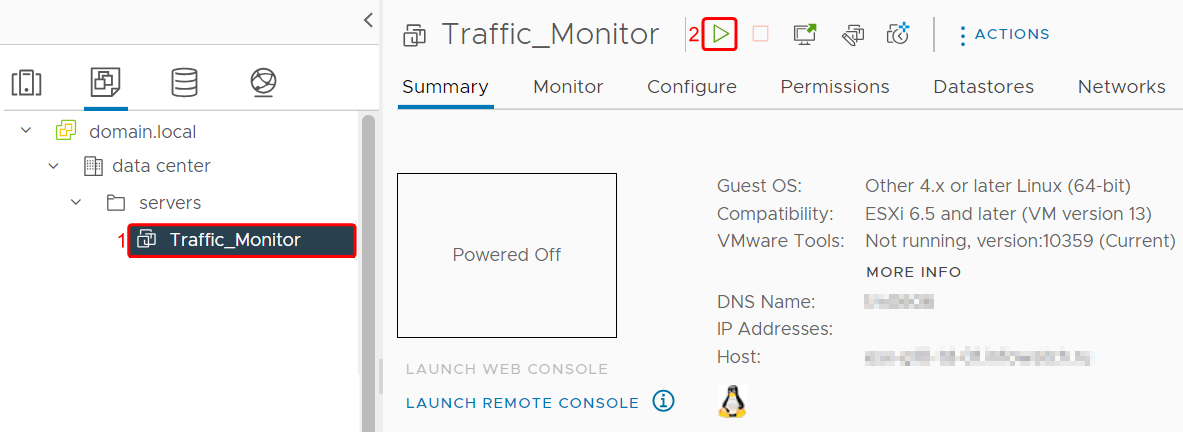
  • в случае виртуального сервера выполните команду Power On (см. пример ниже).

Раскрыть
titleПример запуска виртуального сервера:
Информация
titleПримечание:

В настоящей инструкции приводятся примеры по работе с виртуальным сервером в веб-версии клиентского приложения одной из наиболее часто используемых сред виртуализации – VMware vSphere (VMware vSphere Client).

Рамками на рисунках выделены области интерфейса, которые нужно последовательно выделять щелчком мыши для достижения требуемых результатов.

  1. Запустите веб-версию клиентского приложения VMware vSphere Client. Войдите в приложение, используя логин и пароль, выданные администратором вашей информационной сети.
  2. Последовательно раскройте все узлы в левой части рабочей области, пока не дойдете до нужного виртуального сервера.
  3. Включите виртуальный сервер:
  4. Через некоторое время виртуальный сервер включится и клиентское приложение примет вид:

Обновите серверы согласно следующим инструкциям:

Если вы используете Data Storage, рекомендуется обновить его. Инструкция приведена в статье "Обновление Data Storage".

Информация
titleПримечание:

Сведения по обновлению подсистемы Device Monitor смотрите в документе "InfoWatch Device Monitor. Руководство по установке, конфигурированию и администрированию".

Информация
titleПримечание:

После обновления Системы предустановленные привилегии на полное управление запросами и отчетами для пользователей с ролями Офицер безопасности и Администратор в Системе отсутствуют.

Информация
titleПримечание:

При наличии выгрузок из БД, требуется ожидание до 7 минут после обновления Системы для корректной работы технологии анализа. Если ожидание невозможно, добавьте любой элемент технологии выгрузок из БД и примените конфигурацию. После чего добавленный элемент может быть удален.

Sv translation
languageen
Предупреждение
titleWarning!

Traffic Monitor can be updated to version 7.12.x from versions 7.10.x and 7.11.x. Releases history can be found in the article "InfoWatch Traffic Monitor Documentation".

Информация
titleNote:

The System is updated from a connected repository.

A repository is a folder that contains files and other folders and provides them on demand to the operating system. In other words, a repository is a storage from which programs can be installed or updated. Before using the repository, you need to connect the repository so that the operating system could access it.

You can find a Guide on how to work with the repository on the Red Hat Enterprise Linux official website.
Информация
titleNote:

Traffic Monitor upgrade is not supported when connecting to server via HP Integrated Lights Out (ILO).

Предупреждение
titleWarning!

Before starting the upgrade to version 7.12.x, run the script to define the duplicates of graphical objects in the System and delete them. To do this, run the following script in the console of DBMS PostgreSQL:

Блок кода
//Automatic deletion of duplicate Graphic Object imprints
with fingerprint_to_delete as (
  with duplicate_contents as (
    select content_id, count(f2c.fingerprint_id) cnt
    from fingerprint_to_content_sb f2c
    left join fingerprint_sb f on f.fingerprint_id=f2c.fingerprint_id
    where f.type = 'image_classifier'
    group by content_id
    having count(f2c.fingerprint_id) > 1
  )
  select f2c.fingerprint_id
  from duplicate_contents dc
  left join fingerprint_to_content_sb f2c on f2c.content_id = dc.content_id
  where f2c.fingerprint_id not in (
    select (select fingerprint_id from fingerprint_to_content_sb where content_id=dc.content_id limit 1)
    from duplicate_contents dc
  )
order by dc.content_id
)
delete from fingerprint_sb
where fingerprint_id in (select fingerprint_id from fingerprint_to_delete);

In case there are no duplicates, the System will inform you to start the upgrade.

After the script execution has been completed, logout from the database.

Предупреждение
titleWarning!

Before updating the System, it is required to apply the configuration. If the configuration is not to be applied before the update, it is to be forced.

During the update, events are neither intercepted nor analyzed.

Информация
titleПримечание:

During IW Traffic Monitor update, the operations that require sysdba rights will be performed:

Раскрыть
titleOracle DBMS
  • iwtm_logon_trg trigger creation that is used to provide iwtm_linux and iwtm_web users access to objects of iwtm scheme;
  • Creation of sp_iwtm_execute_os_command procedure to run OS commands when creating, removing, archiving and restoring table space files;
  • Setting user profile by default (password lifetime, password change limit and connection attempts limit);
  • Setting service windows of dbms_scheduler;
  • Disabling access to XDB using HTTP protocol;
  • Disabling dispatcher, as a particular server is used;
  • Providing iwtm user with
    • DB installation, update and uninstallation rights;
    • Daily tablespaces creation, removing, archiving and restoring rights;
    • Rights that are used in InfoWatch Traffic Monitor code;
    • Rights to access DB statistics.
Раскрыть
titlePostgreSQL DBMS
  • Creation of wraper function to read files, stop and break sessions, create table spaces and provide iwtm with rights for them;
  • Removing all views and functions from iwtm scheme in order to create the required ones later during update to a new version;
  • Providing iwtm user with:
    • Rights to create DB objects;
    • Rights to install, update, ininstall DB scheme;
    • Rights to create, remove, archive and restore table spaces;
    • Rights to clear postgres server statistics that are used in pgstat diagnostics script;
    • Rights for statistic views and tables to collect statistics of DB operation;
    • Rights that are used in InfoWatch Traffic Monitor code;
    • Rights to view DB statistics;
    • Rights for pgagent scheme to create and manage jobs.
Информация
titleNote:

In case sudo i command was used when installing the product, make sure you use the same command to update the System on RED OS.

Before the update, make sure that you have:

  • Red Hat Enterprise Linux 7.x distribution disk ISO image;
  • InfoWatch Traffic Monitor distributive of the version to which you want to update the System;
  • Access to a physical or a virtual server (or servers) which you want to update;
  • Password for the root user.

Also, before the update, you need to find out:

  • The System installation type (it can be All-in-One or Distributed installation) – this information is required in order to choose the right instruction for the update;

  • Which DBMS is used (Oracle or PostgreSQL) – this information is required for updating the database scheme and server components;
  • The server where web-gui is installed – this information is required in order to clear the server cache after updating the database scheme.
    Tip: the package is installed on the server to which Traffic Monitor Management console is connected.

Before the update, take the following actions:

  1. Turn on each server you want to update (in case it is off):
    • For a physical server – press the power button on the server (for details, see instructions for the server);
    • For the virtual server – run Power On command (see the example below).

      Раскрыть
      titleExample of launching a virtual server:
      Информация
      titleNote:

      This instruction contains examples of working with a virtual server in the web version of a client application of one of the most common virtualization environments – VMware vSphere (VMware vSphere Client).

      In frameworks, you can see interface areas that you need to click in the specified order to achieve the desired results.

      1. Run VMware vSphere Client application. Authorize in the application using the login and password issued by the administrator of your network.
      2. Consistently expand all the nodes on the left side of the workspace until you see the required virtual server. 
      3. Turn on the virtual server:

        Some time later, the virtual server will start and the client application will look as follows:


  2. Connect InfoWatch Traffic Monitor distributive to the servers you want to update, using your OS or virtualization system resources. 

Update the servers, following these instructions:

If you use Data Storage, it is recommended to update it. You can find the instruction in the "Обновление Data Storage" article.

Информация
titleNote:
 For information on how to update Device Monitor Server and Agents, see "InfoWatch Device Monitor. Installation, Configuration and Administration Guide".
Информация
titleNote:

After the System is updated, preinstalled privileges for complete queries and reports management are unavailable for users with Security officer and Administrator roles.

Информация
titleNote:

When using DB unloading you should wait for 7 minutes after upgrade is complete to ensure the correct operation of analysis technology. In case you cannot wait, please add one element of DB unloading technology and apply configuration. Right after this you can remove the element you've added.