Дерево страниц

Сравнение версий

Ключ

  • Эта строка добавлена.
  • Эта строка удалена.
  • Изменено форматирование.
Комментарий: Published by Scroll Versions from space TMAG and version 7.15
Sv translation
languageru

При перехвате копии трафика через Sniffer для увеличения производительности Системы можно создавать кластеры серверов Traffic Monitor.

Предупреждение
titleВажно!

При использовании кластера сетевое соединение между Sniffer и сервером Traffic Monitor должно обеспечивать скорость передачи, в два раза превышающую ту скорость, с которой трафик поступает на Sniffer.

Чтобы создать кластер серверов Traffic Monitor, на каждом экземпляре сервера Traffic Monitor, который будет входить в кластер:

  1. В конфигурационном файлеsniffer.confубедитесь, что секция Usedareas имеет следующий вид:

    Блок кода
    languagetext
    "UsedAreas": [
    "capstack",
    "http",
    "icq",
    "smtp"
    ]

    По умолчанию данная настройка выполнена.

  2. В конфигурационном файле proxy.conf, в  в разделе Iscp секций Smtp, Icq, и Http укажите значение параметров Host и Port, на котором запущен процесс iw_sniffer.
    Например, для настройки взаимодействия с компьютером, имеющим IP-адрес 10.20.30.40 и порт 4301(по умолчанию), раздел Iscp для перехватчика ICQ будет выглядеть следующим образом:

    Блок кода
    languagetext
    "iscp": {
    "ListenArea": "icq",
    "Host": 10.20.30.40,
    "Port": 4301
    }
  3. В конфигурационном файле sniffer.conf для каждой из секций Smtp, Icq,  и Http укажите значение параметра Balancer. Возможные значения:
    • Easy – для каждого нового TCP-соединения выбирается экземпляр Traffic Monitor Server с iw_proxy. При этом поочередно будут задействованы все экземпляры сервера Traffic Monitor.;
    • IpPref – распределение трафика между несколькими экземплярами сервера Traffic Monitor с iw_proxy выполняется на основании IP-адреса клиента. При этом все данные с одинаковым IP-адресом клиента будут передаваться на один экземпляр сервера Traffic Monitor.

По умолчанию указан параметр IpPref.

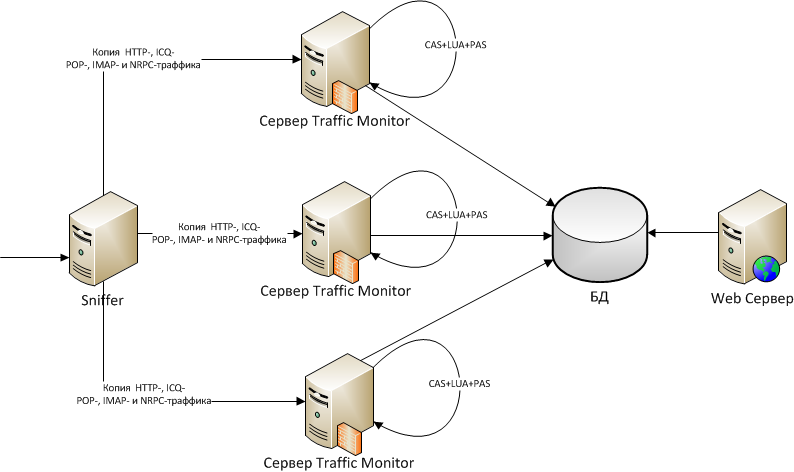
Пример. Создание кластера из нескольких (до трех) экземпляров сервера Traffic Monitor

Система перехватывает копию SMTP-, ICQ- и HTTP-трафика через Sniffer. Для повышения производительности создается кластер из нескольких (в данном случае – трех) экземпляров сервера Traffic Monitor. С помощью параметра Balancer выбирается оптимальный тип нагрузки серверов Traffic Monitor. Эта опция позволяет избежать задержек в обработке данных и потерь пакетов данных. Серверы анализируют трафик с помощью технологий, и затем происходит запись данных в БД для дальнейшего использования.   
 

Sv translation
languageen

If the traffic copy is intercepted by Sniffer, then you can create clusters of Traffic Monitor servers in order to increase the System performance.

Предупреждение
titleWarning!

If a cluster is used, then the speed of a network connection between Sniffer and Traffic Monitor server should be twice as large as the speed at which traffic arrives at Sniffer.

To create a cluster of Traffic Monitor servers on each TM server instance that will be included in the cluster:

  1. In the sniffer.conf configuration file, make sure that the Usedareas section looks like this:

    Блок кода
    languagetext
    "UsedAreas": [
    "capstack",
    "http",
    "icq",
    "smtp"
    ]

    By default, this parameter is specified.

  2. In the proxy.conf configuration file, in Iscp part of Smtp, Icq, and Http sections, specify the values of Host and Port, on which the iw_sniffer process is running. 
    For example, to set up interaction with a computer which has an IP address of 10.20.30.40 and port 4301 (by default), the Iscp part for ICQ interceptor will look like this:

    Блок кода
    languagetext
    "iscp": {
    "ListenArea": "icq",
    "Host": 10.20.30.40,
    "Port": 4301
    }
  3. In the sniffer.conf configuration file, specify the value of the Balancer parameter for Smtp, Icq, and Http sections. Possible values:
    • Easy – for each new TCP connection, an instance of Traffic Monitor Server with iw_proxy is chosen. In this case, all Traffic Monitor Server instances are used one in a turn.
    • IpPref – the traffic is distributed between several instances of Traffic Monitor server with iw_proxy based on an IP address of the client. In this case, all data with the same IP address of the client is transmitted to the same instance of Traffic Monitor server.

By default, the IpPref parameter is used.

Example. Creating a cluster of several (up to three) Traffic Monitor server instances

The System intercepts a copy of SMTP, ICQ and HTTP traffic via Sniffer. To increase the performance, you can create a cluster of several (three in this case) Traffic Monitor Server instances. With the Balancer parameter, you can choose the optimal type of load on Traffic Monitor servers. This option allows you to avoid delays in processing data and losing data packages. The servers analyze traffic, then the data is saved to the database for further usage.