Дерево страниц

Сравнение версий

Ключ

  • Эта строка добавлена.
  • Эта строка удалена.
  • Изменено форматирование.
Комментарий: Published by Scroll Versions from space TMAG and version 7.13
Sv translation
languageru

С помощью выгрузки из базы данных Traffic Monitor может контролировать отправку данных по электронной почте. Выгрузка из базы данных должна соответствовать требованиям (см. документ InfoWatch Traffic Monitor. Руководство пользователя. Рекомендации по подготовке выгрузки), в том числе содержать в последнем столбце каждой строки адрес электронной почты, на который разрешено отправлять данные этой строки. Поля последнего столбца считаются ключами и по ним выгрузка не индексируется. Это решение позволяет защитить большой объем данных без ручного создания множества объектов защиты и политик. В транспортном режиме Блокировка (работа в разрыв) Traffic Monitor позволит блокировать отправку писем с защищаемыми данными или отправлять их в карантин.

По умолчанию после установки Traffic Monitor функциональность отключена.

Чтобы включить возможность использовать выгрузку из базы данных для проверки получателей:

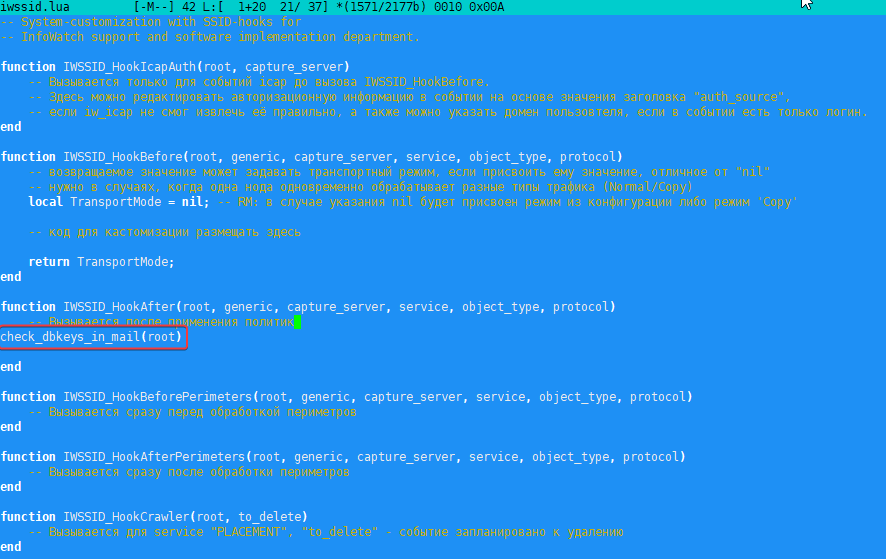
  1. В файле /opt/iw/tm5/etc/scripts/iwssid.lua добавьте команду вызова функции check_dbkeys_in_mail(root), как указано на изображении ниже.
  2. После сохранения изменений проверьте права доступа с помощью команды:

    Блок кода
    languagetext
    ls -la /opt/iw/tm5/etc/scripts/iwssid.lua

    code
    languagetext
    title

    Пример вывода с корректными правами доступа:

    Блок кода
    languagetext
    -rw-r--r--. 1 iwtm iwtm 2181 июл 24 09:43 /opt/iw/tm5/etc/scripts/iwssid.lua
  3. Если права были изменены и не соответствуют примеру, для изменения прав доступа выполните команду:
    Блок кода
    languagetext
    chown -R iwtm:iwtm /opt/iw/tm5/etc/scripts/iwssid.lua
  4. Перезапустите сервисы Traffic Monitor с помощью команды:

    Блок кода
    languagetext
    iwtm restart
Предупреждение
titleВажно!

Учитывайте, что на работу с выгрузками из базы данных влияют параметры конфигурационного файла /opt/iw/tm5/etc/cas.conf:

  • MinWords (значение по умолчанию – 10). При такой настройке Система создаст событие с нарушением, если письмо с недопустимым получателем содержит защищаемые данные, длина которых в анализируемом элементе события не менее указанного количества слов10 слов, включая слова, соответствующие условиям обнаружения выгрузки. В противном случае объект защиты не будет детектироваться и будет создано событие без нарушения.;
  • MaxCheckLimit (значение по умолчанию – 0). При значении больше нуля Система продолжает поиск до тех пор, пока не найдет указанное указанное максимальное количество максимальное количество строк с уникальными ключами (или количество уникальных строк, если выгрузка без ключей). Параметр  Параметр доступен только при использовании типа поиска поиска Следующие друг за другом все слова из ячейки без учета порядка и при выключенной оптимизации ("StopOnLimitExceed": false).

Подробнее о параметрах см. документ InfoWatch Traffic Monitor. Справочник по конфигурационным файлам.

Чтобы отключить функциональность:

  1. В файле /opt/iw/tm5/etc/scripts/iwssid.lua удалите команду вызова функции check_dbkeys_in_mail(root).
  2. Перезапустите сервисы Traffic Monitor с помощью команды:
    Блок кода
    languagetext
    iwtm restart
Sv translation
languageen

Traffic Monitor can use a database unloading to control sending data by email. The database unloading must meet the requirements (see the InfoWatch Traffic Monitor. User Guide. Recommendations on Preparing Unloadings). The last column of each row in the unloading must contain the email address to which data of this row is allowed to be sent. The fields of the last column are considered keys and the unloading is not indexed by them. This solution allows you to protect a large amount of data without manually creating a lot of protected objects and policies. In the Blocking transport mode (the in-line mode), Traffic Monitor allows you to block sending emails with protected data or send them to quarantine.

By default, after Traffic Monitor installation, this functionality is disabled. 

To enable the ability to use the database unloading for recipient validation:

  1. In the/opt/iw/tm5/etc/scripts/iwssid.lua file, add a command to call the check_dbkeys_in_mail(root) function as you can see in the picture below.
  2. After you save changes, check permissions with the command:

    Блок кода
    languagetext
     ls -la /opt/iw/tm5/etc/scripts/iwssid.lua
    title
    Информация

    Example where the correct permissions are displayed:

    Блок кода
    languagetext
    -rw-r--r--.  1   iwtm iwtm  2181   jul  24   09 : 43   /opt/iw/tm5/etc/scripts/iwssid.lua
  3. If the permissions have been changed and do not match the example above, use the following command to edit the permissions:
    Блок кода
    languagetext
    chown -R iwtm:iwtm /opt/iw/tm5/etc/scripts/iwssid.lua
  4. Restart Traffic Monitor services with the command:

    Блок кода
    languagetext
     iwtm restart
Предупреждение
titleImportant!

Please, keep in mind that parameters of the cas.conf configuration file affect the operation with database unloadings:

  • MinWords  (10 by by default). The System creates an event with a violation if an email with an impermissible recipient contains protected data of a length is not less than the number of words specifiedat least 10 words, including words which satisfy detection conditions. Otherwise, the System does not detect a protected object and creates an event without a violation.;
  • MaxCheckLimit (0 by default). If the value is greater than zero, the System continues searching until it finds the specified maximum number of lines with unique keys (or number of unique lines in case the unloading does not contain keys). The parameter is available only for All words in one cell following each other in any order search type and if optimization if disabled ("StopOnLimitExceed": false).

For details, see InfoWatch Traffic Monitor. Configuration Files Guide.

To disable the functionality:

  1. In the /opt/iw/tm5/etc/scripts/iwssid.lua file, delete the command that calls the check_dbkeys_in_mail(root) function.
  2. Restart Traffic Monitor services with the command:
    Блок кода
    languagetext
    iwtm restart