Дерево страниц

Сравнение версий

Ключ

  • Эта строка добавлена.
  • Эта строка удалена.
  • Изменено форматирование.
Комментарий: Published by Scroll Versions from space TMAG and version 7.0
Sv translation
languageru

Сервер Traffic Monitor используется как промежуточный почтовый сервер. В его состав входит почтовый сервер Postfix.
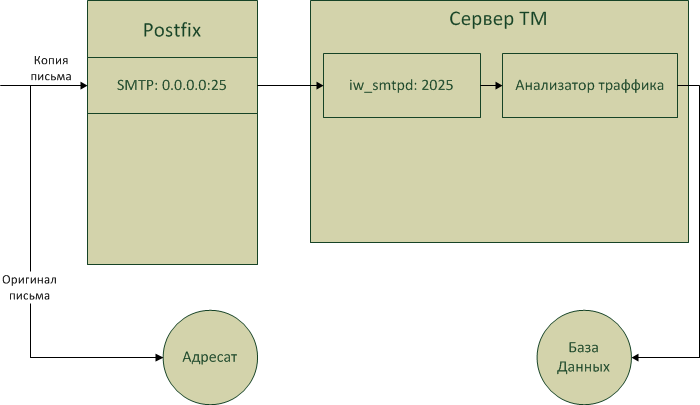
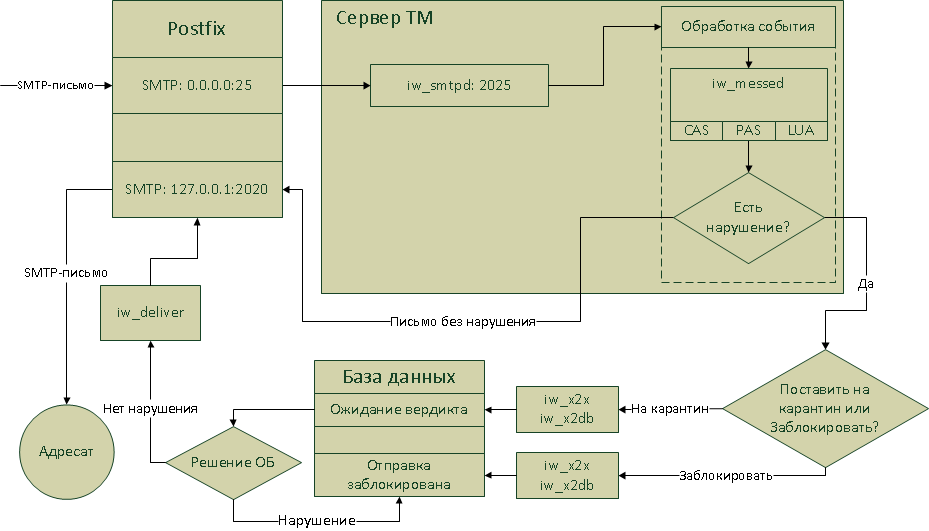
Интеграция сервера Traffic Monitor с почтовым сервером реализуется следующим образом. Почтовый сервер Postfix, встроенный в систему Traffic Monitor, принимает входящие SMTP-письма на 25 порт. Далее входящие SMTP-письма передаются процессу iw_smtpd на порт 2025. В Системе создается событие для каждого из писем. В зависимости от схемы работы (Копия или Блокировка), возможны следующие варианты движения SMTP-трафика:

  • Режим Копия –  SMTP-трафик передается адресату, а также с помощью Postfix - в InfoWatch Traffic Monitor.

  • Режим Блокировка – SMTP-трафик анализируется системой Traffic Monitor, и
    • если нарушение отсутствует, SMTP-трафик с помощью встроенного сервера Postfix передается адресату или следующему relay-серверу в почтовой системе организации. Доставка осуществляется так: процесс iw_messed передает письма на порт 2020 почтового сервера Postfix. Почтовый сервер Postfix либо напрямую доставляет письма адресатам, либо передает их следующему почтовому relay-серверу;
    • если обнаружено нарушение, и в политиках указан вердикт Поместить на карантин, то Система выставляет письму вердикт Карантин. Письмо будет доставлено только в том случае, если Офицер безопасности выставит вердикт Нет нарушения, разрешая доставку письма в Консоли управления (см. документ «InfoWatch Traffic Monitor. Руководство пользователя»). Доставка осуществляется следующим образом: процесс iw_deliver передает письма на порт 2020 почтового сервера Postfix, встроенного в Систему. Почтовый сервер Postfix либо напрямую доставляет письма адресатам, либо передает их следующему почтовому relay-серверу;
    • если обнаружено нарушение, и в политиках указан вердикт Заблокировать, то Система выставляет письму вердикт Заблокировано. Доставка письма в данном случае будет заблокирована, а событие помещено в Базу данных.


Чтобы настроить работу "в разрыв", выполните следующие действия:

  1. На корпоративном почтовом сервере в качестве relay-сервера настройте сервер Traffic Monitor.

    Информация
    titleПримечание:

    Если в организации используется более одного почтового сервера, каждый из них должен быть настроен на отправку исходящих сообщений на встроенный в Систему сервер Postfix. В зависимости от того, какой почтовый сервер используется в компании, данная настройка может различаться

    В результате данной настройки весь почтовый трафик от корпоративного почтового сервера будет направляться только на сервер Traffic Monitor.

  2. Убедитесь, что включен автозапуск процессов iw_smtpd и iw_deliver (см. "Автозапуск процессов").
  3. Настройте встроенный в Систему Postfix (см. "Настройка сервера Postfix в системе Traffic Monitor").
  4. Откройте файл iwssid.lua, расположенный в директории /opt/iw/tm5/etc/scripts, на редактирование.
  5. Раскомментируйте следующую секцию кода, указав действительное имя сервера ТМ ( например, tm.server.name) и значение режима Normal (режим "Блокировка"): 
    iwssid_smtp_servers['tm.server.name'] = 'Normal';

    Примечаниеwarning
    titleПримечание:Важно!

    При распределенной установке режим определяется по локальному серверу Traffic Monitor с установленным почтовым сервером Postfix/Exim. Для этого укажите на каждой ноде в процессом iw_luaengined, расположенном локально или на другой ноде кластера. Поэтому на каждой ноде в файле /opt/iw/tm5/etc/scripts/iwssid.lua укажите действительное имя сервера ТМ (например, tm1.org.ru) и нужный режим (например, Copy): iwssid_smtp_servers['tm1.org.ru'] = 'Copy';

    Важно! Файл iwssid.lua при этом должен быть одинаковым на всех нодах кластера.

  6. Сохраните файл.

  7. Перезагрузите Систему:
    iwtm restart

Предупреждение
titleВажно!

Выбранный режим будет применен только для SMTP-перехватчика. Описание более гибкой настройки приведено в статье " Настройка работы "в разрыв" для нескольких перехватчиков ".


Досылка SMTP-писем с ошибками обработки, отправленных "в разрыв"

SMTP-письма, в процессе обработки которых произошли ошибки, помещаются в очереди ошибок: queue/x2x-errors и queue/errors. Досылка писем (в том числе с вердиктом "Карантин") из очередей ошибок осуществляется посредством демона iw_rammer, после чего очереди очищаются. Адреса отправителей и получателей берутся (при наличии) из .xml-файла. В случае их отсутствия письмо досылке не подлежит. При отправке письма Офицеру безопасности адреса отправителя и получателя указываются в конфигурационном файле opt/iw/tm5/etc/rammer.conf. Во вложении к письму передаются .xml и .dat-файлы объекта. Досылка письма адресату, а также оповещения Офицеру безопасности, осуществляется через почтовый сервер Postfix (порт 2020). Уведомления Офицеру безопасности со вложенным  доставленным письмом приходят в виде "письма-события", отправитель которого берется из исходного письма. Данные для подключения (адрес и порт), задаются в конфигурационном файле rammer.conf (см. документ "Справочник по конфигурационным файлам", файл "rammer.conf").

SMTP-письмо будет досылаться при соблюдении одновременно всех условий:

  1. если оно еще не было доставлено штатным способом (демоном iw_messed);
  2. если во время обработки письма и попадания его в очередь ошибок установлен режим работы "Блокировка";
  3. если у письма не проставлен вердикт "Заблокировано".

Средством принудительной досылки писем служит утилита /opt/iw/tm5/bin/rammer_tool. Для вызова списка возможных настроек наберите в командной строке:

/opt/iw/tm5/bin/rammer_tool --help   
Sv translation
languageen

Traffic Monitor Server is used as an intermediate mail server. It includes Postfix mail server.

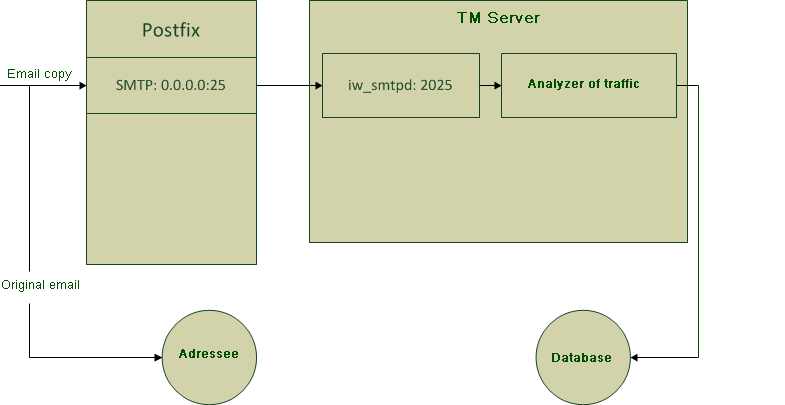
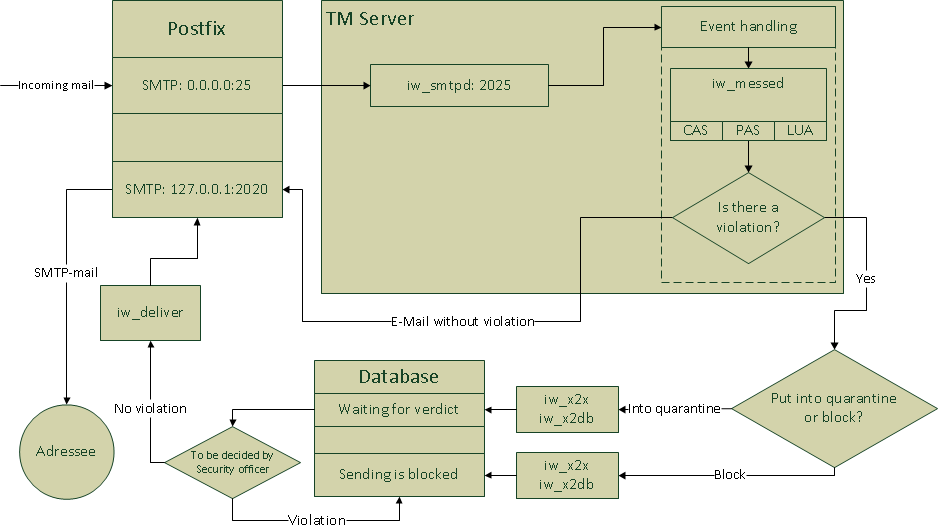
Integration of Traffic Monitor mail server with a mail server is implemented in implemented the following way. Postfix mail server which is embedded in the Traffic Monitor system receives incoming SMTP messages via port 25. SMTP messages are then transmitted to the iw_smtpd process via port 2025. For each message, the System creates an event. Depending on the selected scheme (Copy or Block), SMTP traffic can be transmitted in the following ways: 

  • Copy mode considers that SMTP traffic is transmitted to the recipient and also to InfoWatch Traffic Monitor via Postfix


Block mode considers that Traffic Monitor System analyzes SMTP traffic and,

  • if there is no violation, SMTP traffic is transmitted to the recipient or to the next relay server in the corporate mailing System via the embedded Postfix server. Delivery is performed as follows: iw_messed process transmits messages to 2020 port of Postfix mail server. Postfix mail server delivers messages to recipients directly or transmits them to the next relay server
  • if there is a violation and according to policies this should be a Quarantine verdict, the System gives Quarantine verdict to the message. It will be delivered only if the Security Officer changes the verdict to No violation in Management Console (see the document «InfoWatch Traffic Monitor. User guide»). The delivery is performed as follows: iw_messed process transmits messages to 2020 port of the embedded Postfix mail server. Postfix mail server delivers messages to recipients directly or transmits them to the next relay server
  • if there is a violation and according to policies this should be a Block verdict, the System gives Blocked verdict to the message. Sending will be blocked and the event will be put into DB

To configure the inline mode:

  1. Configure Traffic Monitor as a relay server on a corporate mail server.

    Информация
    titleNote:

    If the company uses more than one mail server each server should be configured to send messages to the embedded Postfix server.

    The configuration process may differ depending on the mail server which is used in the company.

    As a result, all mail traffic sent from a corporate mail server is transmitted to Traffic Monitor Server.

  2. Make sure that autostart for the iw_smtpd and iw_deliver processes is enabled (see "Process Autorun").
  3. Configure Postfix server embedded in the System (see "Configuring Postfix Server in Traffic Monitor system").
  4. Open the file iwssid.lua /opt/iw/tm5/etc/scripts to edit;
  5. Uncomment the following code section by filling in the valid name of TM server (for example tm.server.name) and mode value Normal (Block mode):
    iwssid_smtp_servers['tm.server.name'] = 'Normal';

    Примечаниеwarning
    titleNote:Important!

    In case of distributed installation, the mode is defined on local Traffic Monitor server with embedded Postfix/Exim post server. In by the iw_luaengined process located on the computer or on another node. That is why, on each node in /opt/iw/tm5/etc/scripts/iwssid.lua file you need to specify the valid name of TM server on each node (for example tm1.org.ru) and the required mode (for example, Copy): iwssid_smtp_servers['tm1.org.ru'] = 'Copy';

    Important! The file iwssid.lua should be the same on all the nodes.

  6. Save the file.
  7. Restart the System:
    iwtm restart
Предупреждение
titleWarning!

Chosen mode will be applied to SMTP interceptor only. For more flexible configuration, see "Configuring Inline Mode for Server Interceptors".

Delivering SMTP emails with processing errors, sent in "inline mode"

SMTP emails processing of which caused errors, are to be put into the error queues: queue/x2x-errors и queue/errors. Delivering SMTP emails (including the ones with "Quarantine verdict" assigned) is performed by iw_rammer daemon from error queues. After that, the queues are to be refined. Sender and addressee addresses (if sufficient) to be taken from .xml file. Otherwise, the email cannot be delivered. When sending e-mail to Security officer, adressee addressee and recipient adresses addresses are specified within the configuration file opt/iw/tm5/etc/rammer.conf. The enclosed mail contains object  .xml and .dat files. E-mail sending to the addressee as well as notification for Security officer is performed via Postfix mail server (port 2020). Notification is to be delivered to security officer via event email and the sender is specified from the initial message. Connection data (address and port), as well as the addressee and sender addresses, are set within the rammer.conf configuration file (for details, see the document "Configuration Files Guide", the "rammer.conf" file). 

SMTP email is to be delivered when meeting the following terms:

  1. if it wasn't delivered in a regular mode (by daemon iw_messed);   
  2. If "Block" mode is installed  when processing the e-mail and when the e-mail got into error queue;
  3. if the email wasn't qualified as the "Blocked" one.

Mandatory delivery measure is opt/iw/tm5/rammer-tool utility. To view the list of available settings, enter in the command line:

/opt/iw/tm5/bin/rammer_tool --help