The Mail Monitor interceptor allows you to control incoming and outgoing e-mail. The Mail Monitor rule provides control of SMTP, IMAP, POP3, MAPI, HTTPS protocols and Outlook. | Информация |
|---|
| For HTTPS, the System controls emails sent via the following services: - Gmail
- Yandex
- Mail.ru
- Yahoo
- Rambler
- Outlook.com
On mobile devices, emails sent via HTTPS are not intercepted. |
| Предупреждение |
|---|
| The rule applies on computers with MS Windows and Astra Linux OS and mobile devices on Android platform. On computers with Astra Linux, the rule controls only SMTP, POP3, IMAP and HTTPS protocols. |
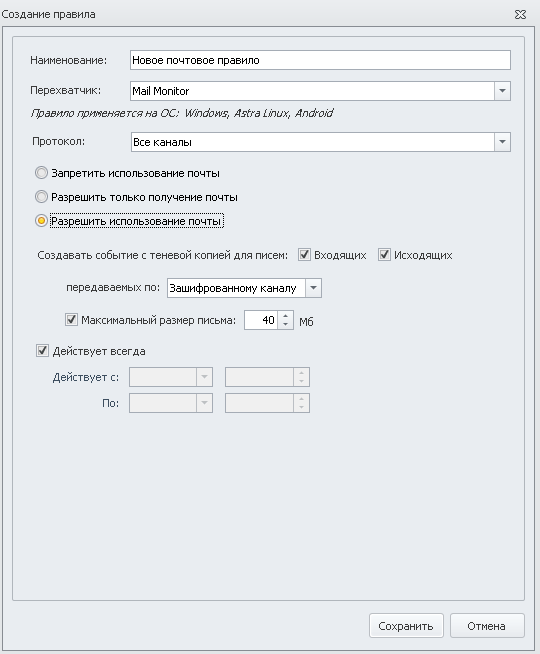
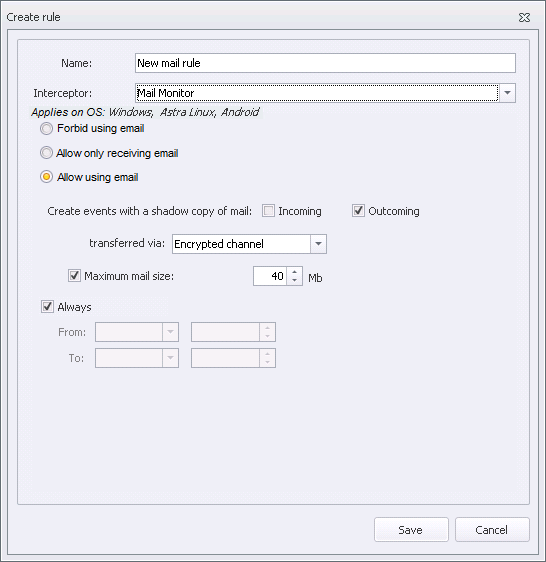 Image Removed To configure the rule: - Open the Create rule window (see "Создание правил (DM)") and in the Name field, specify the rule name.
- In the Interceptor field, select Mail Monitor.
In the Protocol field, choose the channel that will be controlled by the rule. Possible values: - All channels;
- SMTP - only for outgoing mail;
- POP3 - only for incoming mail;
- Outlook - both for incoming and for outgoing mail;
- IMAP - only for incoming mail;
- HTTPS - only for outgoing mail.
| Информация |
|---|
| On DM agents version 6.7 and earlier, only rules with All channels value operate properly. |
- Choose what actions with mail are allowed for the user. Possible values:
- In the Create events with a shadow copy of mail line, specify for what emails shadow copies should be created. Depending on the channel selected in step 6 the following values are available:
- for POP3 and IMAP channels - only the Incoming direction;
- for SMTP and HTTPS - only the Outgoing direction;
- for Outlook and All channels - both Incoming and Outgoing directions are available. You can choose one value or both.
| Предупреждение |
|---|
| If the Allow using email option is enabled, then at least one mail direction (Incoming or Outgoing) should be selected, otherwise, the rule won't be saved. |
You can also define additional parameters of shadow copies: In the transferred via field, specify if shadow copies should be created for emails sent via all channel or only via encrypted ones; | Информация |
|---|
| For HTTPS protocol, the All channels value is unavailable. |
Maximum mail size. If the option is enabled, shadow copies will be created only for emails whose size is smaller or equal to the specified one.
- Define a period of the rule action. By default, the rule is always in effect (the Always option is checked). To specify the rule (DM) duration, clear Always check box and specify dates and time in From and To fields.
- When all parameters are configured, click Save.
| Предупреждение |
|---|
| If the rule has the following attributes: - Allow using mail;
- Create events with a shadow copy of mail: Incoming and Outcoming, transferred via: All channels
and the mail program is configured to store data on the server (e.g., in MS Outlook, the Save sent items to the next folder on the server option is enabled in the Internet E-mail Settings dialog box, Sent tab), then each mail sending event will generate two interception objects: one of the Outcoming type and the other one of the Incoming type. Depending on the mail program, the option name may differ| Примечание |
|---|
| Чтобы перехват почты по протоколам IMAP, SMTP, POP3 работал на сетевом уровне: - Добавьте Outlook в исключения (см. "Исключение приложений из перехвата")
- Создайте правила для перехвата по этим протоколам, как описано выше.
- Удалите правило для протокола Outlook/MAPI.
|
|