Дерево страниц

Сравнение версий

Ключ

  • Эта строка добавлена.
  • Эта строка удалена.
  • Изменено форматирование.
Комментарий: Published by Scroll Versions from space TMIG and version 6.11

Для работы с vimdiff на сервере должен установлен текстовый редактор vim. 

Рассмотрим объединение на примере файлов user.lua и user.lua.rpmnew. После обновления (при условии, если в штатный файл user.lua вносились изменения) появится файл user.lua.rpmnew. Необходимо корректно перенести все установленные ранее значения параметров и настроек из user.lua в user.lua.rpmnew. Для этого:

  1. Перейдите в директорию /opt/iw/tm5/etc/config/lua/scripts/
  2. Введите в командной строке:
    vimdiff user.lua.rpmnew user.luatalk
  • Перейдите в режим редактирования (клавиша Insert).
  • Вручную перенесите различающиеся значения параметров из user.lua в user.lua.rpmnew.
  • Выйдите из режима редактирования (клавиша Esc).
  • Сохраните изменения в файле user.lua.rpmnew и выйдите из редактора (введите :wq).
  • Закройте уже не актуальный файл user.lua (введите :q). 
  • Удалите файл user.lua.
  • Переименуйте файл user.lua.rpmnew в user.lua.
  • Sv translation
    languageru

    Во время обновления сервера Traffic Monitor конфигурационные файлы (например, с расширениями .conf, .cfg и .lua), которые были изменены во время использования предыдущей версии, не перезаписываются новыми. В тех же директориях создаются новые файлы с теми же названиями, но с расширением .rpmnew. Для файла iwssid.lua также создается iwssid.lua.upgrade. Это  Это сделано для того, чтобы поддержать возможность изменения структуры файлов новых версий. Для корректной работы Системы потребуется объединить файлы старой и новой версий.

    Предупреждение
    titleВажно!

    Не вносите изменения в файлы web.conf, database.conf, consul.json.

    Используйте любой из приведенных ниже способов объединения файлов.

    Объединение конфигурационных файлов в Midnight Commander

    Рассмотрим объединение на примере файлов postgresql.conf и postgresql.conf.rpmnew.

    Информация
    titleПодсказка:

    Чтобы просмотреть файл, нажмите F3, чтобы отредактировать - F4.

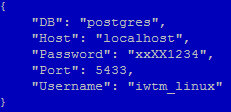
    Файл postgresql.conf имеет вид:

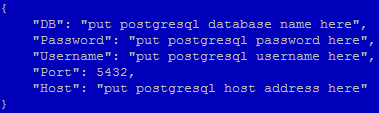
    Файл postgresql.conf.rpmnew имеет вид:

    Для объединения требуется перенести данные из секций файла postgresql.conf в соответствующие секции файла postgresql.conf.rpmnew. Для этого:

    Multiexcerpt
    MultiExcerptNameRU
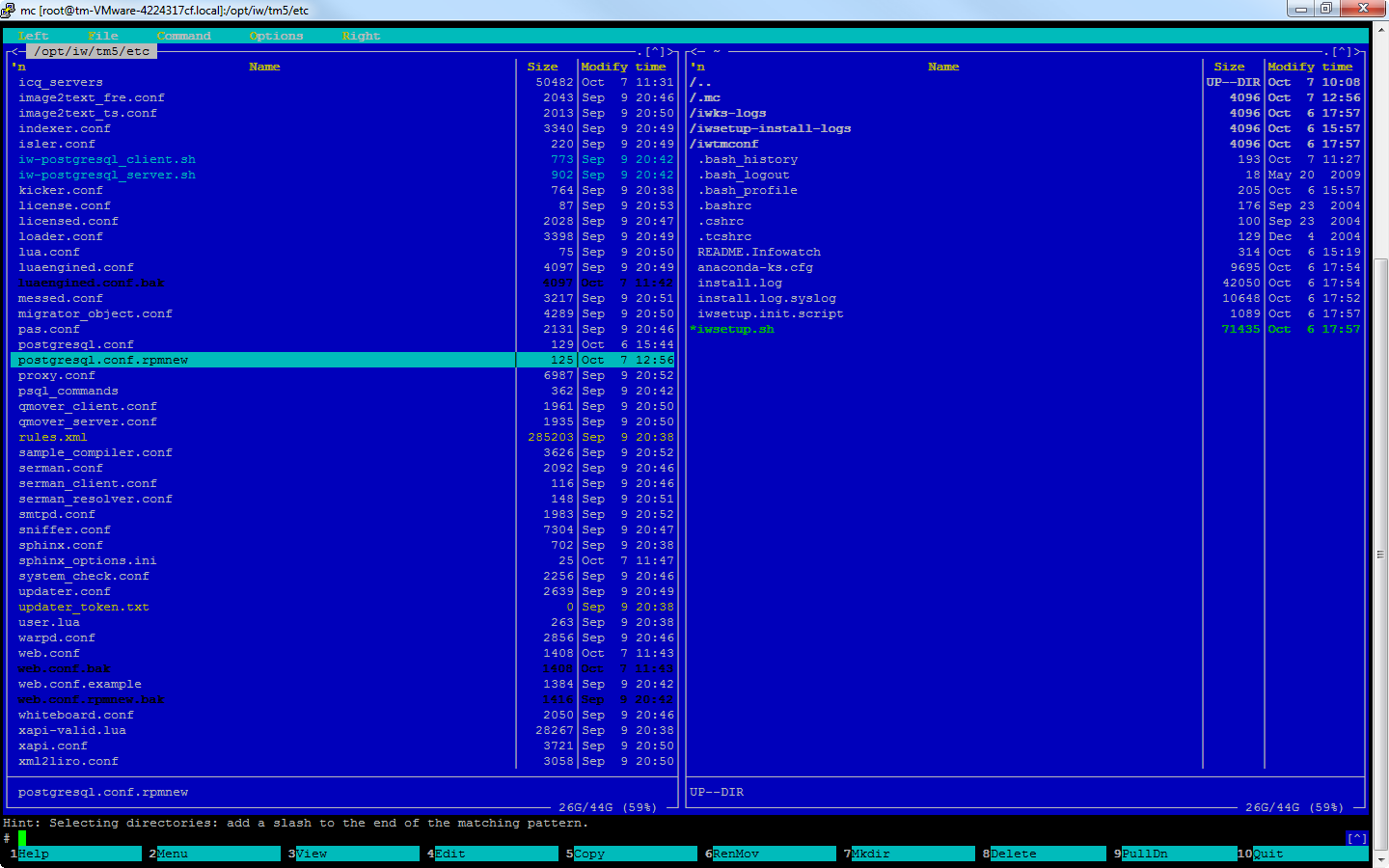
    1. Перейдите в директорию /opt/iw/tm5/etc
    2. Установите курсор на файл postgresql.conf.rpmnew в файловом менеджере.
    3. Нажмите F4.
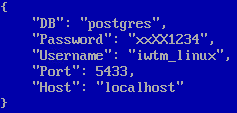
    4. Замените значения секций файла значениями соответствующих секций файла postgresql.conf. Получится так: 

      Информация
      titleПримечание:

      При распределенном типе установки значением поля "Host" будет IP-адрес сервера, на котором установлена СУБД. Например:

    5. Нажмите F2.
    6. В открывшемся окне подтвердите сохранение файла, нажав Save.
    7. Нажмите F10.
    8. Установите курсор на файл postgresql.conf в файловом менеджере.

    9. Нажмите F8 для удаления файла postgresql.conf.
    10. В открывшемся окне подтвердите удаление файла, нажав Yes.
    11. Выделите файл postgresql.conf.rpmnew в файловом менеджере.
    12. Нажмите F6.
    13. В поле to введите /opt/iw/tm5/etc/postgresql.conf и нажмите Enter.
      Теперь в Системе есть только один конфигурационный файл PostgreSQL - postgresql.conf. Он имеет структуру файла новой версии и нужное наполнение:

    Объединение конфигурационных файлов с помощью vimdiff

    talk

    idtalk-6032
    idtalk-6031
    Предупреждение
    titleВажно!
    Чтобы избежать потери данных и ошибок в работе Системы (конфигурационные файлы серверной части Traffic Monitor), необходимо внимательно следовать инструкциям.
    В случае возникновения трудностей при объединении конфигурационных файлов рекомендуется обратиться в службу технической поддержки компании InfoWatch по адресу support@infowatch.com.

    Службы технической поддержки – с 7:00 до 21:00 по московскому времени с понедельника по
    пятницу, исключая официальные выходные и праздничные дни РФ.
    Вы также можете посетить раздел технической поддержки на нашем сайте:
    http://www.infowatch.ru/services/support.

    Предупреждение
    titleВажно!

    Во избежание некорректной работы Системы не стоит объединять следующие файлы с файлами из старых версий:

    1. /etc/rc.d/init.d/postgresql-9.6.rpmnew
    2. /etc/sgml/docbook/xmlcatalog.rpmnew
    Sv translation
    languageen

    During the update of Traffic Monitor server nconfiguration files (e.g, with .conf, .cfg, and .lua extensions) that were modified when using the previous version, cannot be overwritten with the new files. The new files are created in the same directories and with the same names, but with .rpmnew extension respectively. For iwssid.lua file is also created iwssid.lua.upgrade.This is done to support the ability to change the structure of new file versions. For correct operation of the System it is required merging files of an old and a new version.

    Предупреждение
    titleВажно!

    Do not change web.conf, database.conf, consul.json files.

    Use any files merging type specified below.

    Merging configuration files in Midnight Commander

    Let's consider an example to merge postgresql.conf and postgresql.conf.rpmnew files.

    Подсказка
    titleTip

    To view the file content, press F3. For editing, press F4.

    The postgresql.conf file looks like:

    The postgresql.conf.rpmnew file looks like:

    To merge these files, you need to copy data from sections of the postgresql.conf file to the corresponding sections of the postgresql.conf.rpmnew file. For this:

    Multiexcerpt
    MultiExcerptNameENG
    1. Go to /opt/iw/tm5/etc directory.
    2. Position the cursor on postgresql.conf.rpmnew file in the file manager.
    3. Press F4.
    4. Replace the values in the file sections with the values from correspondings sections of the postgresql.conf file. The result looks like this:

      Информация
      titleNote:

      For the distributed installation type, the value of the "Host" field will be an IP address of the server where the DBMS is installed. For example, 

    5. Press F2.
    6. In the window that opens, confirm the file saving by clicking Save.
    7. Press F10.
    8. Position the cursor on the postgresql.conf file in the file manager.

    9. Press F8 to delete the postgresql.conf file.
    10. In the window that opens, confirm the deletion by clicking Yes.
    11. Select the postgresql.conf.rpmnew file in the file manager.
    12. Press F6.
    13. In the to field, enter /opt/iw/tm5/etc/postgresql.conf and press Enter.
      Now the System has only one PostgreSQL configuration file, which is postgresql.conf. It has a structure of the new version and the required content:

    Merging configuration files by means of vimdiff

    To work with vimdiff the editor Vim should be installed on a server. 

    Let's consider an example of merging user.lua and user.lua.rpmnew files. After the update, the user.lua. rpmnew file appears (if the original user.lua file has been changed). You should copy all earlier specified values of parameters and settings from user.lua to user.lua.rpmnew. To do this:

    1. Go to /opt/iw/tm5/etc/scripts directory.
    2. In the command line, enter:
      vimdiff user.lua.rpmnew user.lua
    3. Go into edit mode (Insert key).
    4. If parameter values are different, copy the values from user.lua to user.lua.rpmnew manually.
    5. Exitthe edit mode (Esc key).
    6. Save the changes within user.lua.rpmnew and exit the editor (input :wq)
    7. Close the file user.lua as moot (input :q).
    8. Rename user.lua.rpmnew to user.lua.
    Предупреждение
    titleImportant!

    To avoid data loss and System errors (Traffic Monitor server part configuration files) it is required following the instructions.

    In case of any trouble while merging the configuration files you are recommended contacting InfoWatch service desk via support@infowatch.com.

    Service desk is available from 7 AM till 9 PM Moscow time, from Monday to Friday, except weekends and public holidays.

    You can also find the required info on http://www.infowatch.rucom/support.

    Предупреждение
    titleImportant!

    To avoid System's improper operation you should avoid merging the following files with the files from older versions:

    1. /etc/rc.d/init.d/postgresql-9.6.rpmnew
    2. /etc/sgml/docbook/xmlcatalog.rpmnew