To transfer InfoWatch Device Monitor distribution agent to target computers with Windows OS through shared administrative resources, make sure that the following requirements are met: If a workstation with Windows XP is outside the domain, in the local security policy settings (Control Panel -> Administrative Tools -> Local Security Policy -> Security Options) on this workstation, set the Network access configuration parameter: Sharing and security model for local accounts parameter value to Classic. 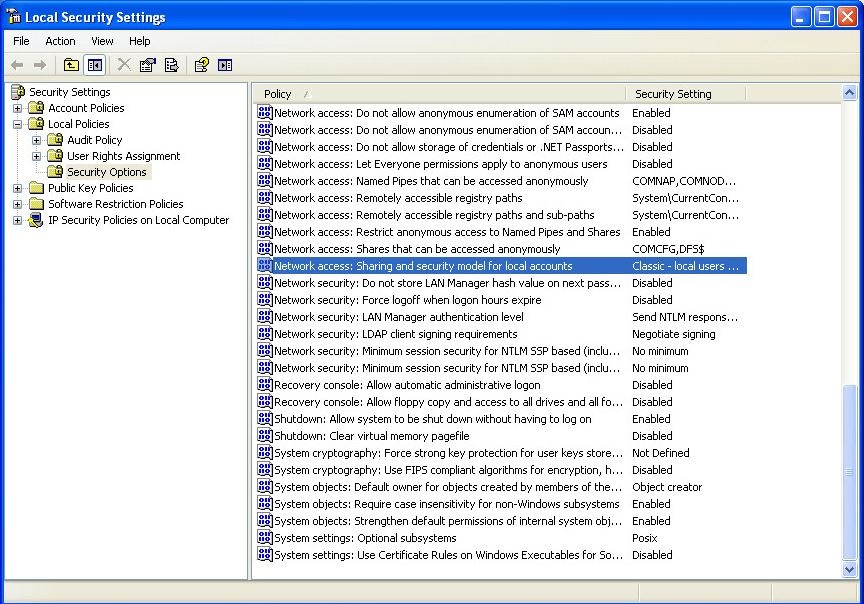
Shared administrative resources (like \\computername\admin$) must be enabled on workstations (in Windows Vista and Windows 7, they are disabled by default). To enable them: Make sure that sharing of files and printers is enabled. In Control Panel, open Network and sharing Center -> Change advanced sharing settings. In the desired profile, enable file sharing and printer sharing. In the registry, in HKEY_LOCAL_MACHINE\SOFTWARE\Microsoft\Windows\CurrentVersion\Policies\System path, add DWORD (32-bit) parameter named LocalAccountTokenFilterPolicy. Set its value to 1. | Информация |
|---|
| After you add the parameter in the registry, you need to log into the System again. |
|