Дерево страниц

Сравнение версий

Ключ

  • Эта строка добавлена.
  • Эта строка удалена.
  • Изменено форматирование.
Комментарий: Published by Scroll Versions from space TMAG and version 6.7
Sv translation
languageru

Сервер Traffic Monitor используется как промежуточный почтовый сервер. В его состав входит почтовый сервер Postfix.
Интеграция сервера Traffic Monitor с почтовым сервером реализуется следующим образом. Почтовый сервер Postfix, встроенный в систему Traffic Monitor, принимает входящие SMTP-письма на 25 порт. Далее входящие SMTP-письма передаются процессу iw_smtpd на порт 2025. В Системе создается событие для каждого из писем. В зависимости от схемы работы (Копия или Блокировка), возможны следующие варианты движения SMTP-трафика:

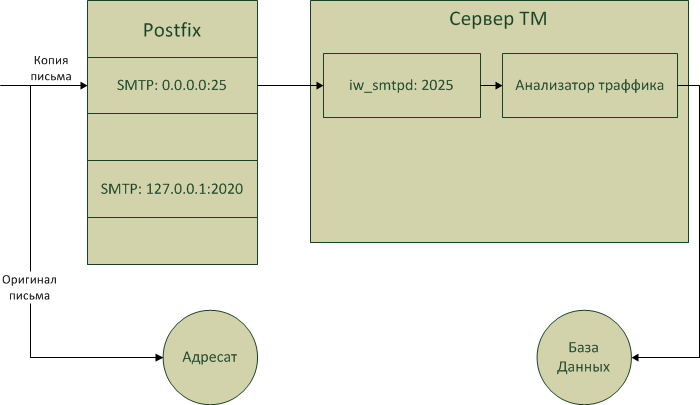
  • Режим Копия – SMTP-трафик с помощью Postfix предается передается адресату или следующему relay-серверу в почтовой системе организации.
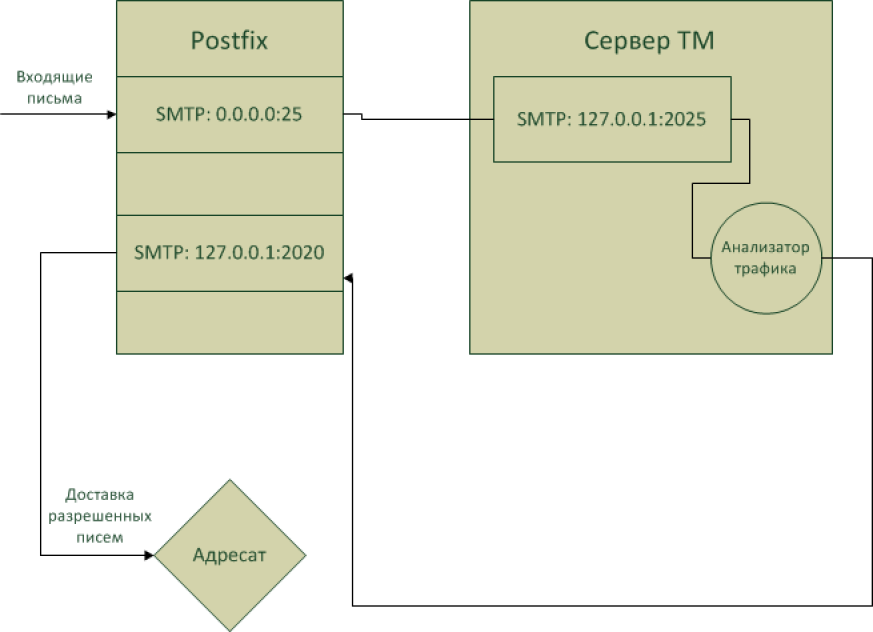
Image Removed
Рисунок 1. Интеграция с Postfix (Копия)Image Added
  • Режим Блокировка – SMTP-трафик анализируется системой Traffic Monitor, и
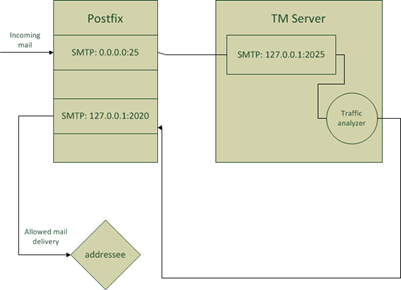
    • если нарушение отсутствует, SMTP-трафик с помощью встроенного сервера Postfix передается адресату или следующему relay-серверу в почтовой системе организации. Доставка осуществляется так: процесс iw_messed передает письма на порт 2020 почтового сервера Postfix. Почтовый сервер Postfix либо напрямую доставляет письма адресатам, либо передает их следующему почтовому relay-серверу;
    • если обнаружено нарушение, Система блокирует доставку письма. Письмо будет доставлено только в том случае, если Офицер безопасности разрешит доставку письма в Консоли управления (см. документ «InfoWatch Traffic Monitor. Руководство пользователя»). Доставка осуществляется следующим образом: процесс iw_messed передает письма на порт 2020 почтового сервера Postfix, встроенного в Систему. Почтовый сервер Postfix либо напрямую доставляет письма адресатам, либо передает их следующему почтовому relay-серверу.
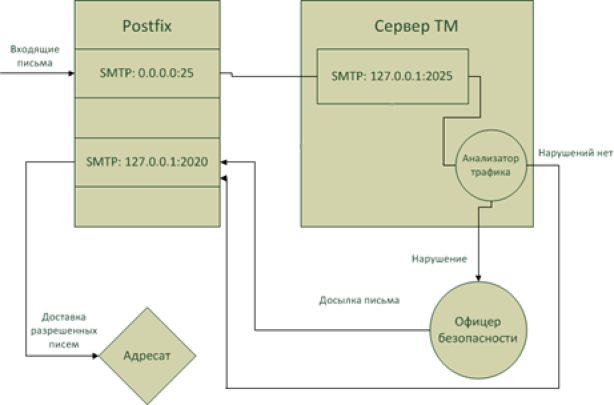
Image Removed
Рисунок 2. Интеграция с Postfix (Блокировка) Image Added

Чтобы настроить работу "в разрыв", выполните следующие действия:

  1. На корпоративном почтовом сервере в качестве relay-сервера настройте сервер Traffic Monitor.

    Информация
    titleПримечание:

    Если в организации используется более одного почтового сервера, каждый из них должен быть настроены на отправку исходящих сообщений на встроенный в Систему сервер Postfix
    В зависимости от того, какой почтовый сервер используется в компании, данная настройка может различаться.

    В результате данной настройки весь почтовый трафик от корпоративного почтового сервера будет направляться только на сервер Traffic Monitor.

  2. Убедитесь, что включен автозапуск процессов iw_smtpd и iw_deliver (см. "Автозапуск процессов").
  3. Настройте встроенный в Систему Postfix (см. "Настройка сервера Postfix в системе Traffic Monitor").
  4. В конфигурационном файле system.lua, расположенном в директории /opt/iw/tm5/etc/scripts, в зависимости от используемой схемы, добавьте соответствующую секцию кода:
  • в случае использования режима «Копия»:

if not get_child(processing, 'transport_mode') then
processing:add_child('transport_mode'):set_text('Copy');

  • в случае использования режима «Блокировка»:

if not get_child(processing, 'transport_mode') then
processing:add_child('transport_mode'):set_text('Normal');

Работа "в разрыв" на агентах DM, установленных на ОС Astra Linux, не осуществляется
Предупреждение
titleВажно!

Выбранный режим будет применен и для SMTP-, и для HTTP(S)-перехватчиков. Описание более гибкой настройки приведено в статье "Настройка работы "в разрыв" для нескольких перехватчиков".

Предупреждение
titleВажно!


Sv translation
languageen

Traffic Monitor Server is used as an intermediate mail server. It includes Postfix mail server.

Integration of Traffic Monitor mail server with a mail server in implemented the following way. Postfix mail server which is embedded in the Traffic Monitor system receives incoming SMTP messages via port 25. SMTP messages are then transmitted to the iw_smtpd process via port 2025. An event for each message is created in the System. Depending on the selected scheme (Copy or Block), the following types of SMTP traffic transmission are possible: 

  • Copy type – SMTP traffic is transmitted to recipient the recipient via Postfix or to the next relay - server in the corporate mailing System.


Picture 1. Postfix integration (Copy)

  • Block type – SMTP traffic is analyzed by Traffic Monitor System, and
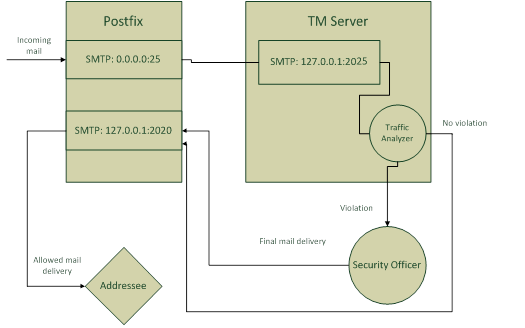
    • In case If there is no violation, SMTP traffic is transmitted to the recipient or to the next relay - server in the corporate mailing System via the embedded Postfix server. Delivery is performed as follows: iw_messed process transmits messages to 2020 port of Postfix mail server. Postfix mail server delivers messages to recipients directly or transmits them to the next relay-server;
    • In case If there is a violation, the System blocks delivery of the message. The message will be delivered only if a the Security Officer allows the delivery in the Management Console (see the document «InfoWatch Traffic Monitor. User guide»). Delivery The delivery is performed as follows: iw_messed process transmits messages to 2020 port of the embedded Postfix mail server. Postfix mail server delivers messages to recipients directly or transmits them to the next relay - server;.


    Picture 2. Postfix integration (Block)

    To configure the inline mode, follow the steps:

    1. Configure Traffic Monitor as a relay - server on a corporate mail server.

      Информация
      titleNote:

      If more than one mail server are used in the organization, each of them should be configured to send outgoing messages to Postfix server.

      Configuration process can be different depending on the mail server used in the company.

      As a result, all mail traffic sent from a corporate mail server will be transmitted to Traffic Monitor Server.

    2. Make sure that autostart for the iw_smtpd and iw_deliver processes has been is enabled (see "Process Autorun").
    3. Configure Postfix server which is embedded in the System (see "Configuring Postfix Server in Traffic Monitor system").
    4. In the system.lua configuration file, which is located in the /opt/iw/tm5/etc/scripts directory, enter the code section for the selected mode:

      • If Copy mode is used:

         if not get_child(processing, 'transport_mode') then

         processing:add_child('transport_mode'):set_text('Copy');

      • If Block mode is used:

            if not get_child(processing, 'transport_mode') then

          processing:add_child('transport_mode'):set_text('Normal');

      Предупреждение
      titleWarning!

      Chosen mode will be applied to SMTP and HTTP(S) interceptors. For more flexible configuration, see "Configuring Inline Mode for Server Interceptors".


      Предупреждение
      titleImportant!

      For DM agents installed on Astra Linux OS, operation in the in-line mode is not supported.