| Sv translation | ||||||||||
|---|---|---|---|---|---|---|---|---|---|---|
| ||||||||||
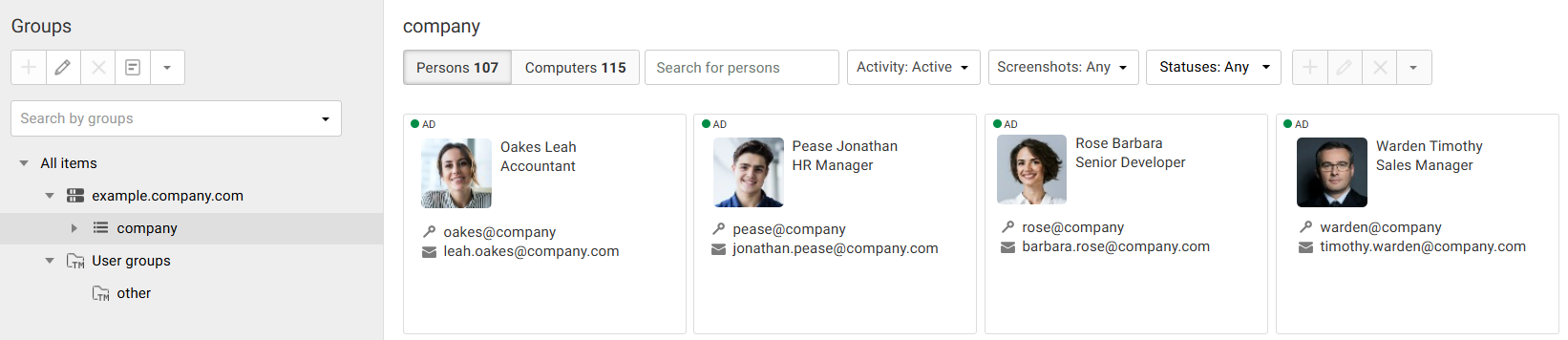
О разделе: Раздел содержит справочник персон и компьютеров информационной системы организации. 
Группы персон и компьютеров В левой части рабочей области отображаются группы персон и компьютеров, видимые текущему пользователю (подробнее . Подробнее см. "Области видимости"). Группы персон и компьютеров могут быть добавлены из Active Directory, Samba DC, Domino Directory, Astra Linux Directory, Astra Linux Directory Pro и FreeIPA, а при синхронизации с LDAP-сервером, а также созданы средствами Traffic Monitor (, см. "Создание группы персон и компьютеров").
С помощью панели инструментов в левой части рабочей области вы можете создать, отредактировать или удалить ранее созданную пользовательскую группу.Кнопка
Персоны и компьютеры При выборе группы в списке в правой части рабочей области отображаются персоны карточки персон и компьютерыкомпьютеров, входящие входящих в группу. Для просмотра списка персон и компьютеров используйте вкладки вкладки Персоны и Компьютеры соответственно. Источники учетных записей обозначаются в карточке при помощи сокращений:
В зависимости от заполненности атрибутов персоны/компьютера в каталоге домена, Система может добавить в карточку учетные записи вида:
Для поиска нужной персоны или компьютера воспользуйтесь полями Поиск персон или Поиск компьютеров соответственно. Переключение полей для поиска происходит при переключении вкладок Персоны и Компьютеры. Сквозной поиск в зависимости от выбранной вкладки осуществляется по имени и фамилии персоны, названию компьютера и значениям контактов и ведется в выбранной и во вложенных группах. Чтобы осуществлять поиск во всех группах раздела, выберите корневой каталог. Допускается ввод символов с маской (например:
При поиске нужных персон и компьютеров вы также можете использовать следующие фильтры:
Для работы с персонами и компьютерами внутри выбранной группы используйте панель инструментов в правой части рабочей области. Действия пользователя:
|


| Sv translation | ||||||||||
|---|---|---|---|---|---|---|---|---|---|---|
| ||||||||||
About the section: The section contains a catalogue of persons and computers of the company information system. 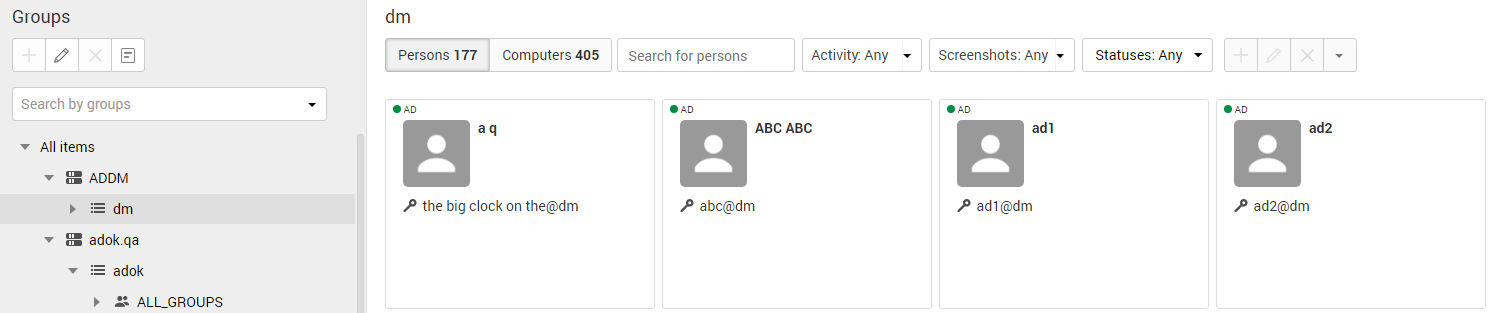
Groups of persons and computers In the left part of the workspace, you can see the System displays groups of persons and computers visible to the current user (see . See "Области видимости" )for details. You can add groups of persons and computers from Active Directory, Samba DC, Domino Directory, Astra Linux Directory, Astra Linux Directory Pro and FreeIPA or an LDAP server or create them in Traffic Monitor (, see "Создание группы персон и компьютеров").
Using tools in the left part of the workspace, you can create, edit or delete an earlier created user group.The button
Persons and computers When you select a group in from the list, the right part of the workspace displays persons and computers of this group. To view the list of persons and computers, use use Persons and Computers tabs respectively. For each person/computer, the System displays account data sources as follows:
Depending on the attributes of a person/computer in the domain catalogue, the System can add domain accounts of the following formats:
To search for desired persons or computers use thу the fields Search by persons and Search by computers. To switch to another field you should switch the tabs Persons or Computers. A crossA cross-cutting search is performed in accordance with the name and surname of selected person, computer name and contatcs contacts details and it is performed within selected catalogue or enclosed ones. To To perform the search through all the section's categories, select the root catalogue. Mask search is supported (e.g.,
When searching for required persons and computers, you can use the following filters:
The toolbar in the left part of the workspace is used for working with groups, while To work with persons and computers within a selected group, use the toolbar in the right part of the workspace allows you to work with persons and computers within a selected group. User’s actions:
|