| Sv translation | ||||||||||||||||||||||||||||||||||||||||||||||||||||||||||||||||||||||||||||||||||||||||||||||||||||||||||||||||||||||||||||||||||||||||||||||||||||||||||||||||||||||||||||||||
|---|---|---|---|---|---|---|---|---|---|---|---|---|---|---|---|---|---|---|---|---|---|---|---|---|---|---|---|---|---|---|---|---|---|---|---|---|---|---|---|---|---|---|---|---|---|---|---|---|---|---|---|---|---|---|---|---|---|---|---|---|---|---|---|---|---|---|---|---|---|---|---|---|---|---|---|---|---|---|---|---|---|---|---|---|---|---|---|---|---|---|---|---|---|---|---|---|---|---|---|---|---|---|---|---|---|---|---|---|---|---|---|---|---|---|---|---|---|---|---|---|---|---|---|---|---|---|---|---|---|---|---|---|---|---|---|---|---|---|---|---|---|---|---|---|---|---|---|---|---|---|---|---|---|---|---|---|---|---|---|---|---|---|---|---|---|---|---|---|---|---|---|---|---|---|---|---|
| ||||||||||||||||||||||||||||||||||||||||||||||||||||||||||||||||||||||||||||||||||||||||||||||||||||||||||||||||||||||||||||||||||||||||||||||||||||||||||||||||||||||||||||||||
Система InfoWatch Traffic Monitor (далее – TM) поставляется в нескольких вариантах. При этом имеет значение режим установки Системы, распределение компонентов, используемая СУБД (система управления базами данных) и редакция системы. Редакции Traffic Monitor Можно выделить следующие типичные варианты решений:
Также в любой редакции Traffic Monitor без приобретения дополнительной лицензии доступны:
Типы установки Traffic Monitor Traffic Monitor можно установить в одном из режимов:
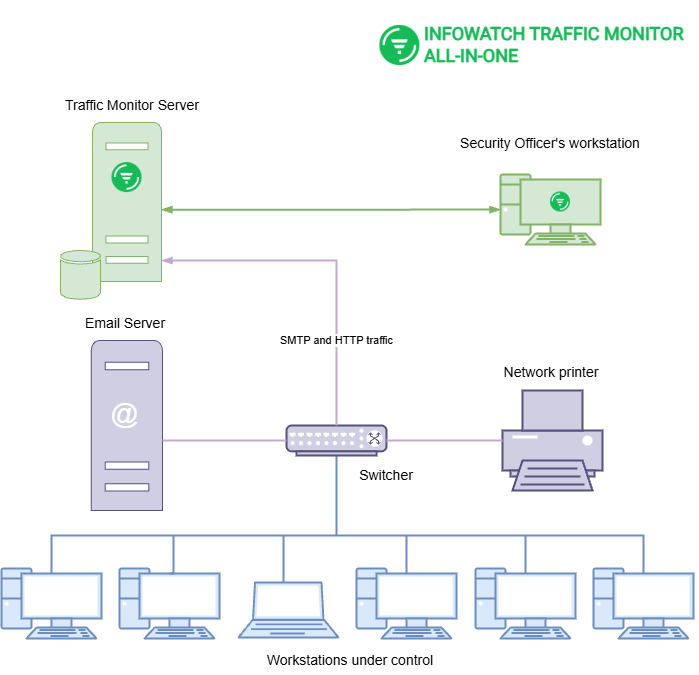
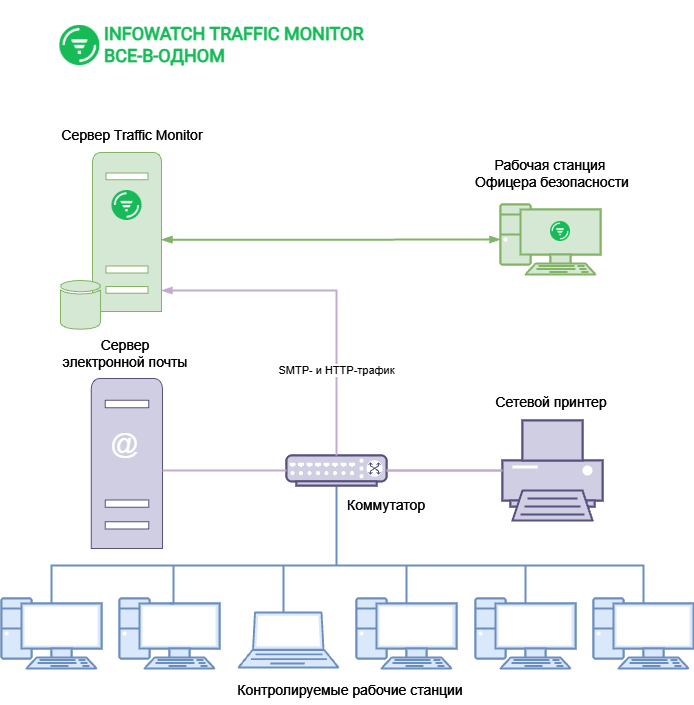
Установка"Все-в-одном" доступна для обеих редакций Traffic Monitor:
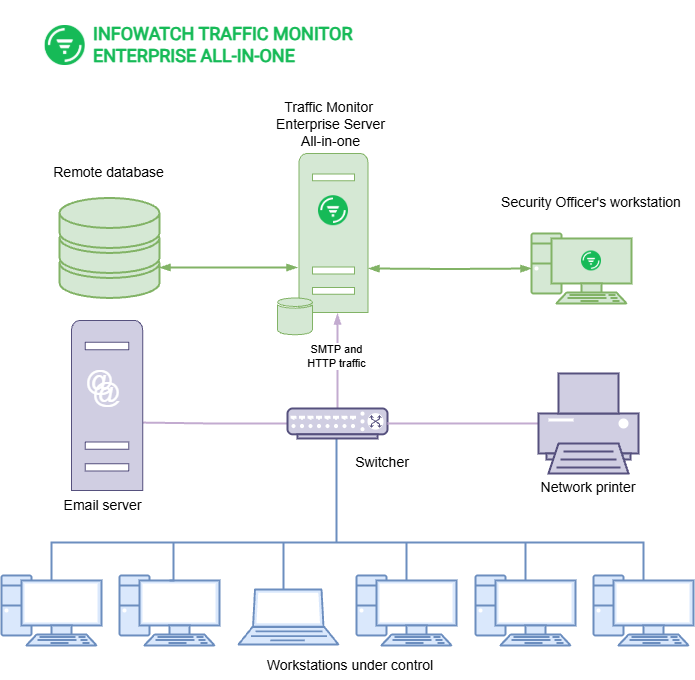
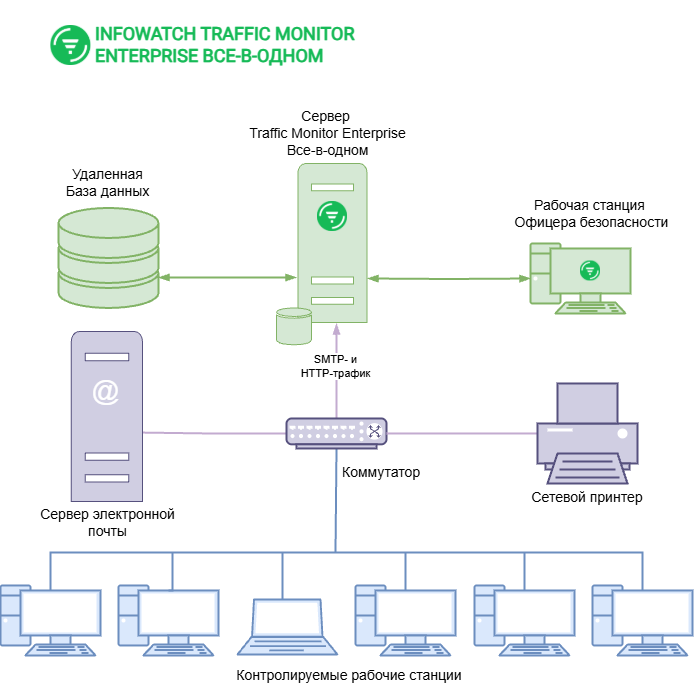
Пример развертывания TM Enterprise "Все-в-одном" с подключением к удаленной базе данных:
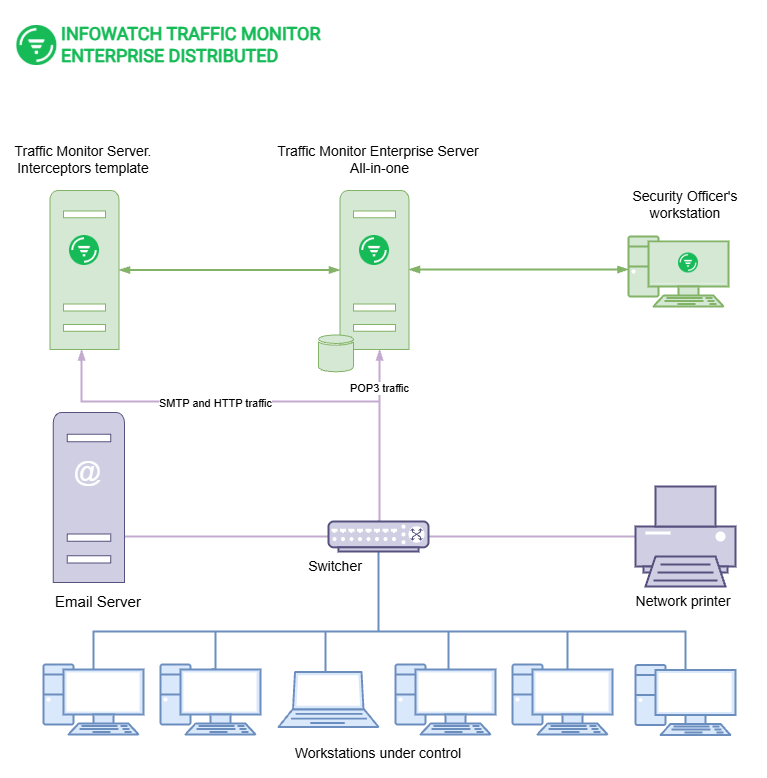
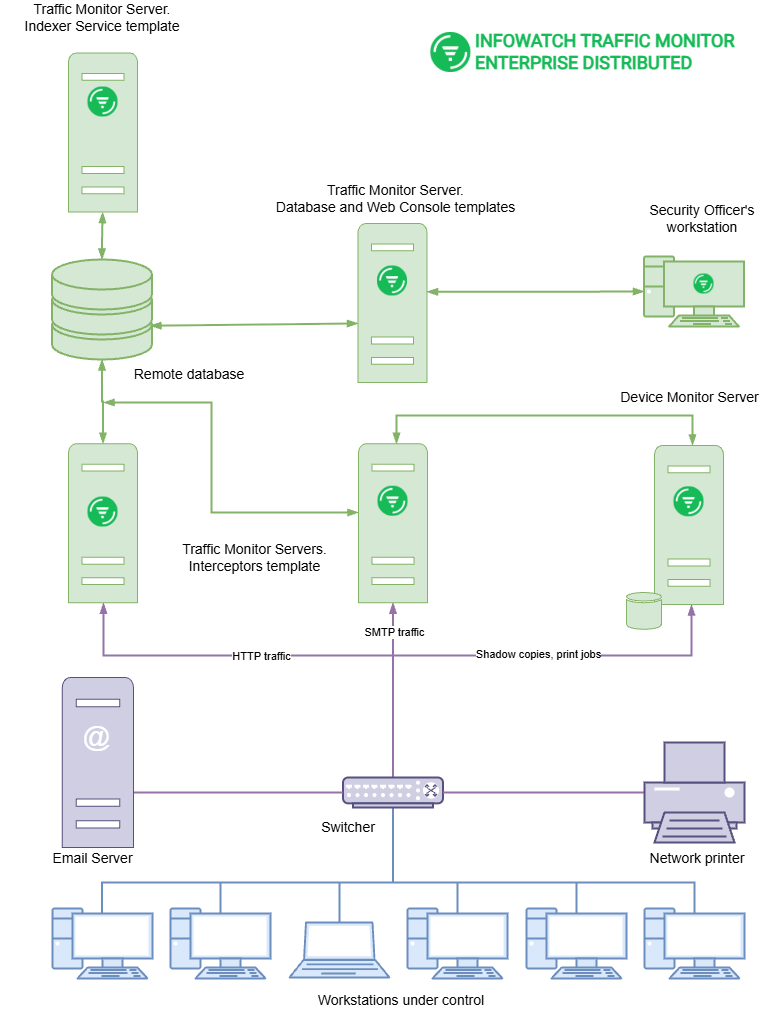
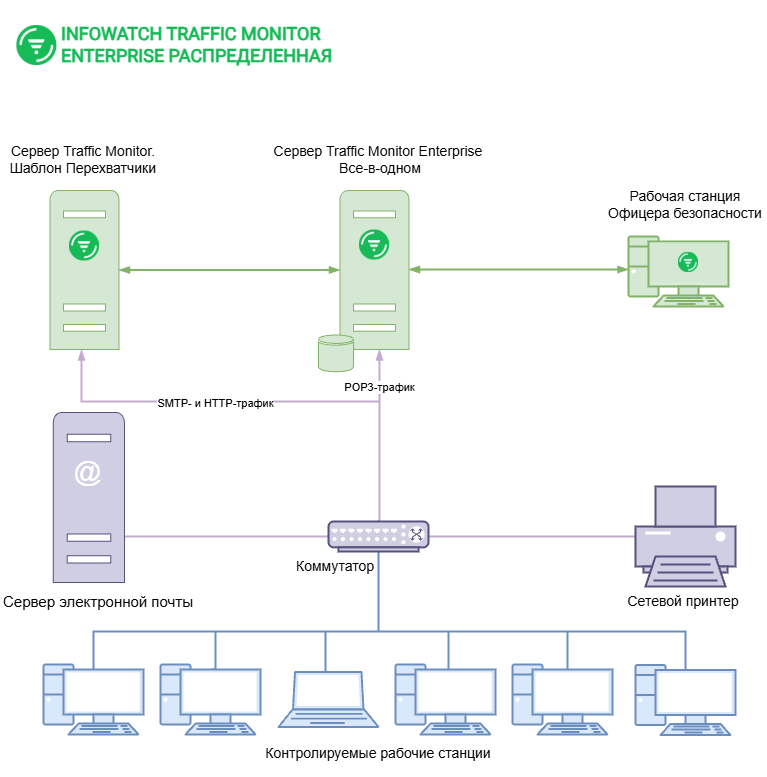
Сервер Traffic Monitor редакции Enterprise, установленный в режиме "Все-в-одном", можно использовать при распределенной установке как один из компонентов Системы. Например, на схеме ниже сервер "Все-в-одном" дополнен сервером перехвата: При распределенной установке Traffic Monitor вы можете:
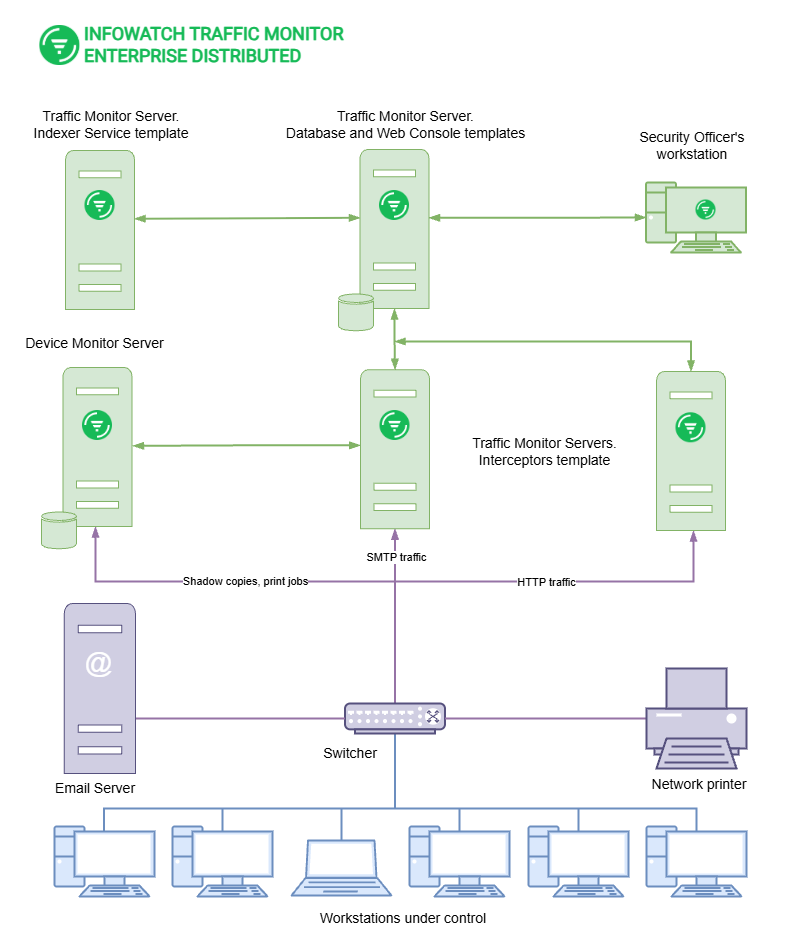
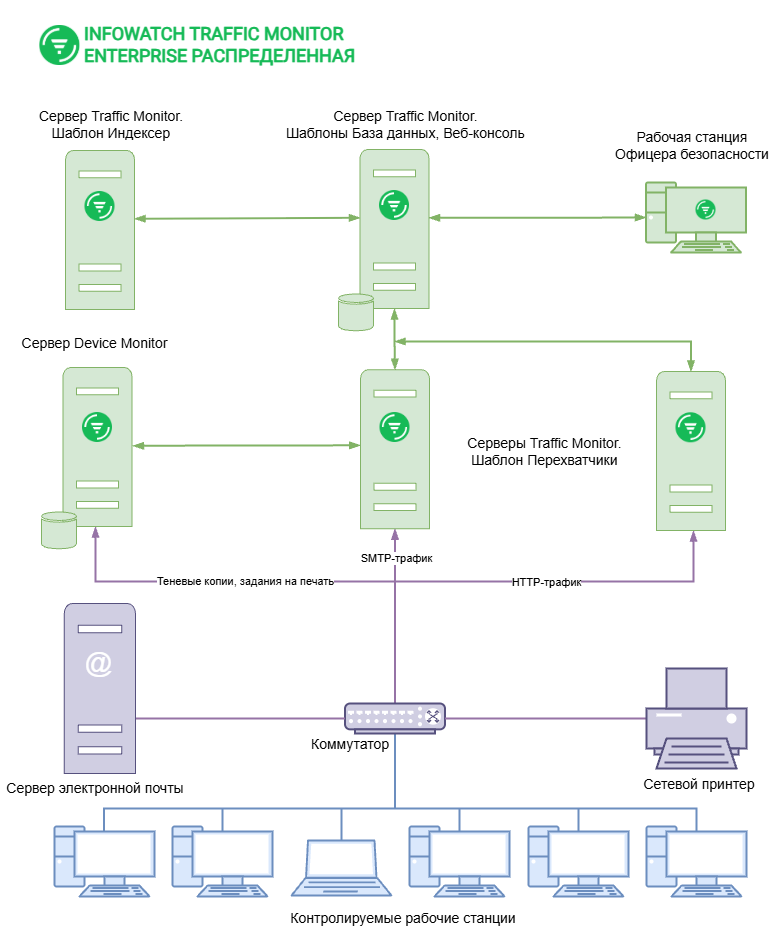
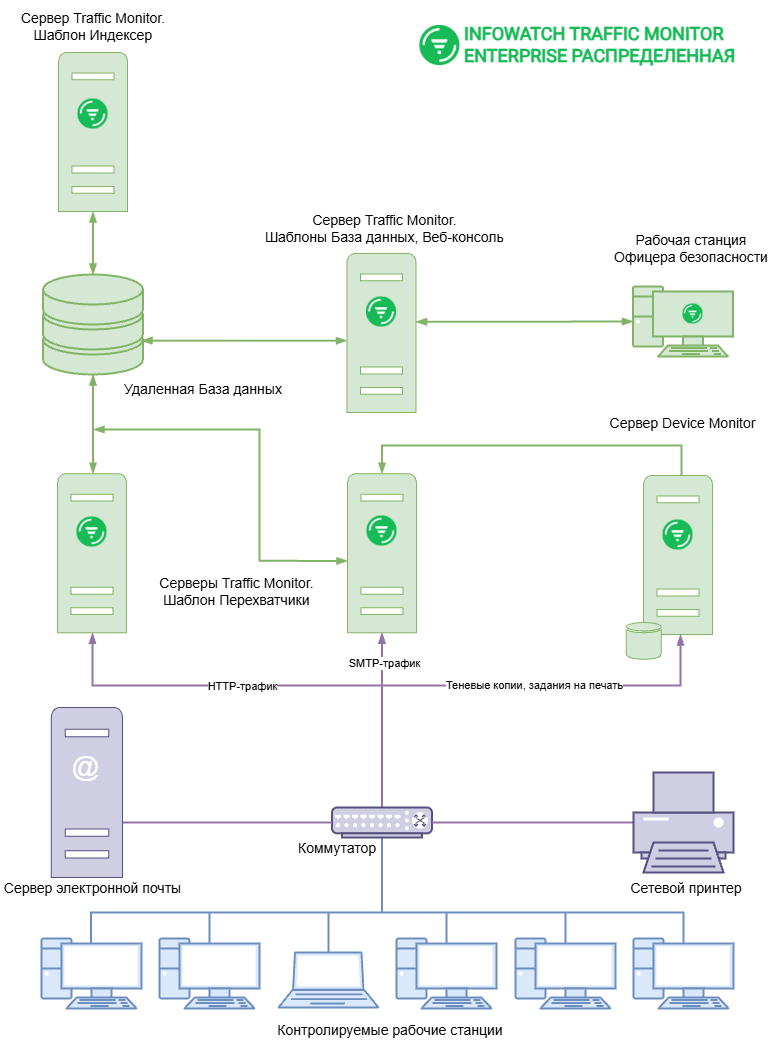
Пример распределенного развертывания TM Enterprise с подключением к удаленной базе данных: Data Storage Вне зависимости от типа установки, в дополнение к базе данных рекомендуется установить внешнее хранилище бинарных данных Data Storage. В нем будут храниться контенты из событий перехвата, например вложения, снимки экрана, звуковые файлы и т.д. Таким образом Data Storage позволит:
Data Storage можно установить как на один сервер с Traffic Monitor, так и на разные. Если количество рабочих станций в компании более 2000, рекомендуем устанавливать хранилище на отдельный сервер. Шаблоны установки
В инсталляторе Traffic Monitor используется система шаблонов установки. Каждый шаблон – это набор компонентов Traffic Monitor, которые будут активированы после развертывания Системы. Наборы компонентов соответствуют функциональным ролям серверов. Роли серверов, выделенные еще на этапе установки, заметно упрощают планирование развертывания Системы, сокращают время ее установки и последующей подготовки к эксплуатации. Использование шаблонов также упрощает масштабирование Системы в ходе эксплуатации. Шаблон определяет только набор активных компонентов, поэтому на сервер будут установлены все компоненты Traffic Monitor, независимо от выбранного шаблона. После установки вы можете изменить набор активных компонентов на сервере. На один сервер можно одновременно установить несколько шаблонов. Установка в режиме "Все-в-одном" – это аналог установки всех шаблонов на один сервер. Совокупность серверов, выделенных для развертывания Системы, образует кластер. Доступны четыре шаблона установки:
Во всех шаблонах после установки будут включены компоненты:
Шаблон "База данных" Шаблон включает в себя СУБД и модули контроля состояния сервера. К шаблону "База данных" относятся следующие процессы:
Шаблон "Индексер" Шаблон включает в себя компоненты для индексации текста объектов, перехваченных Системой и сохраненных в базе данных. Также компоненты шаблона используются для индексации метаданных о событиях перехвата и аудита. Модули шаблона позволяют выполнять поиск по событиям с помощью запросов. Для полнотекстового поиска используется механизм Sphinx. К шаблону "Индексер" относятся следующие процессы:
Шаблон "Веб-консоль" Шаблон включает в себя компоненты Консоли управления Traffic Monitor – графического пользовательского интерфейса. Также к этому шаблону относятся классификаторы текстовых и графических объектов, компоненты лицензирования. К шаблону "Веб-консоль" относятся следующие процессы:
Шаблон "Перехватчики" К шаблону относятся модули, отвечающие за сбор и анализ данных, а также применение политик. Компоненты шаблона обеспечивают перехват трафика в потоке/на шлюзе, передаваемого по протоколам:
Получение шаблоном данных от некоторых сторонних систем реализовано при помощи специальных адаптеров. Подробнее см. документ InfoWatch Traffic Monitor. Руководство администратора. Обработка трафика, полученного от сторонних источников. Рекомендуем горизонтально масштабировать серверы с ролью "Перехватчики", если показатель средней загрузки (load average) становится равным количеству ядер. К шаблону "Перехватчики" относятся следующие процессы:
|
| Sv translation | ||||||||||||||||||||||||||||||||||||||||||||||||||||||||||||||||||||||||||||||||||||||||||||||||||||||||||||||||||||||||||||||||||||||||||||||||||||||||||||||||||||||||||||||||
|---|---|---|---|---|---|---|---|---|---|---|---|---|---|---|---|---|---|---|---|---|---|---|---|---|---|---|---|---|---|---|---|---|---|---|---|---|---|---|---|---|---|---|---|---|---|---|---|---|---|---|---|---|---|---|---|---|---|---|---|---|---|---|---|---|---|---|---|---|---|---|---|---|---|---|---|---|---|---|---|---|---|---|---|---|---|---|---|---|---|---|---|---|---|---|---|---|---|---|---|---|---|---|---|---|---|---|---|---|---|---|---|---|---|---|---|---|---|---|---|---|---|---|---|---|---|---|---|---|---|---|---|---|---|---|---|---|---|---|---|---|---|---|---|---|---|---|---|---|---|---|---|---|---|---|---|---|---|---|---|---|---|---|---|---|---|---|---|---|---|---|---|---|---|---|---|---|
| ||||||||||||||||||||||||||||||||||||||||||||||||||||||||||||||||||||||||||||||||||||||||||||||||||||||||||||||||||||||||||||||||||||||||||||||||||||||||||||||||||||||||||||||||
The InfoWatch Traffic Monitor System (hereinafter – TM) is available in several variants. Its features depend on the System, the distribution of components, the DBMS (database management system) in use, and the edition. Traffic Monitor editions The following typical solutions can be:
In any Traffic Monitor edition, you can also access the following features without purchasing an additional license:
Traffic Monitor installation types You can install Traffic Monitor in one of the modes:
Both Traffic Monitor editions support All-in-one installation:
The scheme illustrates an example of Traffic Monitor Enterprise deployment in All-in-one mode connected to a remote database:
When deploying in the Distributed mode, you can also use an All-in-one TM Enterprise Server as one of the System components. In the example below, the All-in-one Server is extended with the interception server: When installing TM in the Distributed mode, you can:
The scheme shows a distributed deployment example for TM Enterprise connected to a remote database: Data Storage Regardless of installation type, we recommend to install an external storage of binary data – Data Storage in addition to a database. It will store contents from interception events, such as attachments, screenshots, audio files, and so on. With it, you can:
You can install Data Storage and Traffic Monitor on the same or different servers. If there are more than 2000 workstations in your company, we recommend to install the storage on a separate server. Installation templates
Traffic Monitor installation kit contains installation templates. Each template is a set of Traffic Monitor components to be activated after the System is deployed. Sets of components are consistent with the functional roles of the servers. Setting the server roles at the installation stage facilitates the System deployment plan, reduces the installation time, and makes the System easy to operate. Using templates also makes it easier to maintain a large-scale System. Regardless of the selected template, it is used only to define the set of active Traffic Monitor components, so the server will have all the components installed. If needed, you can change the set of active components on a particular server after the installation. One server can have several templates installed at the same time. All-in-one installation is equivalent to installing all templates on a single server. A complex of servers allocated for System deployment composes a cluster. There are four templates available to install:
In all templates, the following services will be started after the installation:
"Database" template The template includes a DBMS and modules to control the server state. The following processes belong to the Database template:
"Indexer service" template The template includes components to index text of objects intercepted by the System and stored in the database. Also, the template components are used to index metadata of interception and audit events. With the template modules, you can search by events using queries. To perform fulltext search, the Sphinx engine is used. The following processes belong to the Indexer service template:
"Web console" template The template includes components of the Traffic Monitor Management console – graphical user interface. Also, this template includes text and graphical object classifiers, as well as license components. With the Management console, you can monitor summary information, create policies and protected objects, add contacts, view events, export data, and create reports. The following processes belong to the Web console template:
"Traffic interceptors" template The template includes the modules responsible for collecting and analyzing data, as well as applying policies. Template components ensure in-stream/at-the-gateway interception of traffic sent using the protocols:
For the template to receive data from a range of third-party systems, use dedicated adapters. See the document InfoWatch Traffic Monitor. Administration Guide. Processing Traffic Received from Third-party Systems for details. In case the load average indicator approximates to the number of kernels, we recommend that you scale out servers with the Traffic interceptors role. The following processes are included to the Traffic interceptors template:
|