| Sv translation | ||||||||||
|---|---|---|---|---|---|---|---|---|---|---|
| ||||||||||
Справочная информация: Объект защиты представляет собой совокупность элементов технологий в содержимом событий. Объекты защиты используются для определения соответствия перехваченных данных определенным бизнес-документам. О разделе: Раздел содержит объекты защиты, сгруппированные в каталоги, и инструменты для работы с ними.
Для каждого каталога отображается его статус (Активный В правой части рабочей области отображаются объекты защиты для выбранного каталога и инструменты для работы с ними, включая сквозной поиск объектов защиты по каталогам. Сквозной поиск осуществляется по названию объекта защиты, а также по названию элементов технологий, входящих в объект защиты. Поиск ведется в выбранном и во вложенных каталогах. Чтобы осуществлять сквозной поиск во всех каталогах раздела, выберите корневой каталог.
При создании нового объекта защиты отображается окно добавления элементов технологий, где вы можете выбрать элементы или каталоги, на основе которых будет создан объект защиты (подробнее о технологиях, используемых в Системе, см. "Определение конфиденциальной информации").
В режиме редактирования объекта защиты вы можете изменить список элементов технологий для выбранного объекта защиты и указать условия обнаружения. Целевые действия пользователя: |


| Sv translation | ||||||||||
|---|---|---|---|---|---|---|---|---|---|---|
| ||||||||||
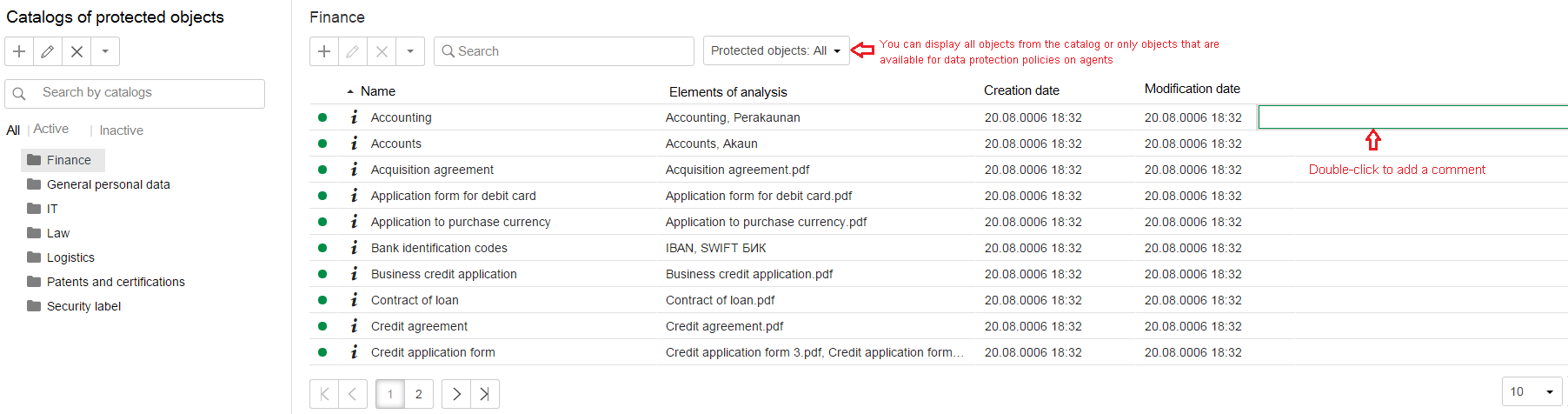
Reference information: The protected object is a set of elements of technologies. Protected objects are used to determine whether the intercepted data correspond to specific business documents. About the section: The section contains a list of events (interception objects) and tools for managing them.
For each catalogue, its status is displayed (Active In the right part of the workspace, protected objects for the selected catalogue are displayed as well as tools for operations with it, incluidng the cross-cutting search within catalogues. A cross-cutting search is performed in accordance with the name of protected object and the name of technologies elements which are a part of protected object. Search is performed within selected catalogue and the enclosed ones. To perform the cross-cutting search through all the section'scatalogues, select the root catalogue. You can switch to all protected objects to be displayed in the catalogue orto display only protected objects, available for data protection policy on agents. For each protected object, the following attributes are displayed: status (Active
When you create a new protected object, a window for adding elements of technologies is displayed where you can choose elements or catalogues that will form the protected object (for more information on technologies used in the System, see "Определение конфиденциальной информации").
In the edit mode of the protected object, you can change the list of elements of technologies and specify detection conditions. User's target actions:
|