Дерево страниц

Сравнение версий

Ключ

  • Эта строка добавлена.
  • Эта строка удалена.
  • Изменено форматирование.
Комментарий: Published by Scroll Versions from space TMINT and version 6.10
Sv translation
languageru

Информация об ошибках и предупреждениях в работе Lotus Domino Adapter записывается в журнал событий eventvwr.msc ► Журналы Windows ► Приложение (или eventvwr.msc ► Windows Logs ► Application).
При обнаружении серьезных проблем в работе Lotus Adapter необходимо предоставить разработчикам следующие файлы, находящиеся на сервере, на котором установлен адаптер:

  1. Журналы событий Windows "Приложение" и "Система".
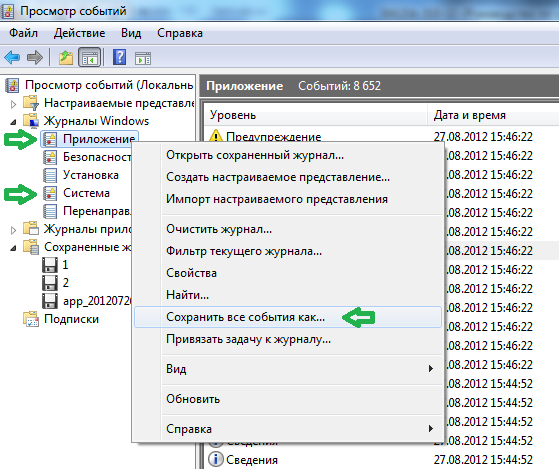
    Для этого необходимо запустить приложение eventvwr.msc, и из контекстного меню сохранить события каждого журнала в файл.
  2. Файл notes.ini с настройками сервера IBM Lotus Domino и модуля Lotus Adapter.
    Находится в каталоге, куда установлен IBM Lotus Domino (по умолчанию C:\Program Files\IBM\Lotus\Domino).
  3. Содержимое файловой очереди сообщений на отправку и очереди ошибочных сообщений.

    Предупреждение
    titleВажно!

    Очереди содержат перехваченные письма, которые в свою очередь могут содержать конфиденциальную информацию.

  4. Файлы диагностической информации IBM Lotus Domino.
    Находится в подкаталоге data\IBM_TECHNICAL_SUPPORT\ каталога, куда установлен IBM Lotus Domino (по-умолчанию C:\Program Files\IBM\Lotus\Domino\ data\IBM_TECHNICAL_SUPPORT).


Sv translation
languageen

Information about errors and warnings in Lotus Domino Adapter operation is logged to eventvwr.msc ► Windows Logs ► Application.

If you have encountered serious problems while using Lotus Domino Adapter, please provide us the following files from the server where the adapter is installed::

  1. Windows Application and System event logs.
    For this, run the eventvwr.msc application and from the context menu of each log, choose Save all events as…

  2. The notes.ini file with IBM Lotus Domino server settings and Lotus Domino Adapter settings.
    You can find this file in the directory where IBM Lotus Domino is installed (by default, C:\Program Files\IBM\Lotus\Domino).
  3. Contents of the file queue with messages to be sent and the error message queue.

    Предупреждение
    titleImportant!

    These queues contain intercepted messages which may include sensitive data.

  4. IBM Lotus Domino diagnostic information files.
    You can find these files in the data\IBM_TECHNICAL_SUPPORT\ subfolder of the folder where IBM Lotus Domino is installed (by default, C:\Program Files\IBM\Lotus\Domino\ data\IBM_TECHNICAL_SUPPORT).